
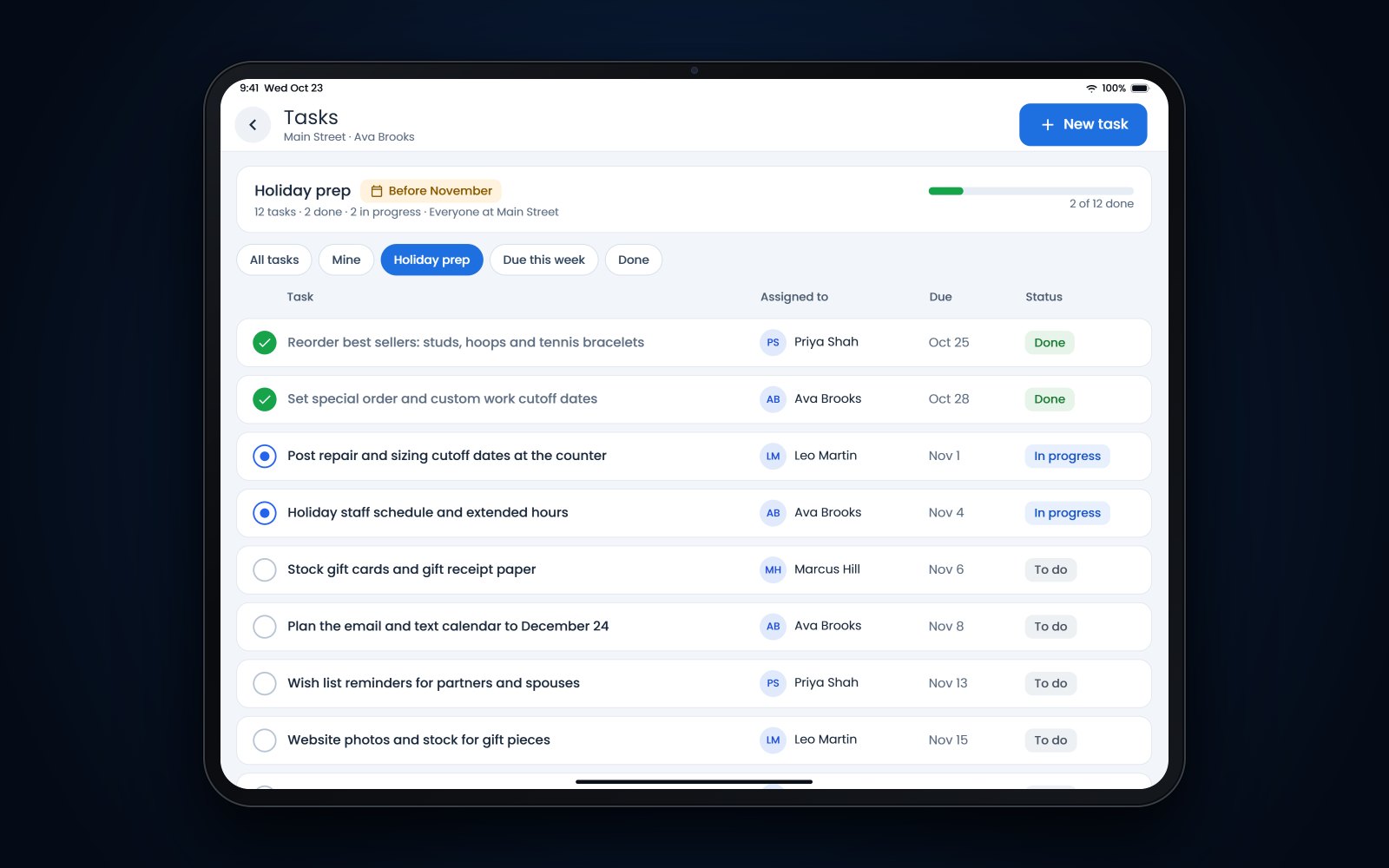
Short answer: A jewelry store holiday checklist should cover 12 jobs, each with one owner and a due date: reorders, special-order and custom cutoffs, repair and sizing cutoffs, staffing, gift cards and gift receipts, wish lists and important dates, an email and text calendar, website stock, the gift return policy, security and case counts, holiday hours and a January plan. Finish most of it by mid-November. This season is short, with only 26 days between Thanksgiving and Christmas, so problems left until December are harder to fix.
In this article
- The jewelry store holiday checklist at a glance
- Reorder best sellers and set special-order cutoffs
- Repair and sizing cutoff dates
- Holiday staffing, schedules and extended hours
- Gift cards, wish lists and your email and text calendar
- Website stock, gift returns and security
- A post-holiday plan for January
- How Flawless POS helps with holiday prep
- Frequently asked questions
The jewelry store holiday checklist at a glance
For example, on December 20 a customer wants a ring sized for Christmas Eve, a vendor's special order hasn't shipped, and 2 part-timers have called in sick. How that day goes depends mostly on decisions you make in October.
This season is shorter than usual. Thanksgiving falls on November 28, and the National Retail Federation notes that the 2024 shopping period between Thanksgiving and Christmas is 26 days, 5 fewer than last year. NRF expects November and December sales to grow 2.5% to 3.5% over 2023 (NRF, October 15, 2024 (opens in a new tab)).
| # | Task | Owner | Done by |
|---|---|---|---|
| 1 | Reorder best sellers and fill gaps in the cases | Owner or buyer | October 31 |
| 2 | Set special-order and custom cutoff dates | Owner and bench jeweler | November 1 |
| 3 | Set repair and sizing cutoff dates | Bench jeweler | November 1 |
| 4 | Lock staffing and the December schedule | Store manager | November 8 |
| 5 | Stock gift cards, gift boxes and gift receipt paper | Store manager | November 8 |
| 6 | Update wish lists, ring sizes and important dates | Each salesperson | November 15 |
| 7 | Write the email and text calendar | Owner | November 8 |
| 8 | Check website stock, prices and photos | Whoever runs the website | November 15 |
| 9 | Confirm the gift return and exchange policy | Owner | November 8 |
| 10 | Review security and set daily case counts | Store manager | November 15 |
| 11 | Set extended hours and post them everywhere | Store manager | November 15 |
| 12 | Write the January plan | Owner | November 22 |
| Date | What happens |
|---|---|
| November 28 | Thanksgiving |
| November 29 | Black Friday |
| December 2 | Cyber Monday |
| December 18 | USPS Ground Advantage send-by date |
| December 19 | USPS Priority Mail send-by date |
| December 21 | USPS Priority Mail Express send-by date |
| December 25 | Christmas, on a Wednesday this year |
Reorder best sellers and set special-order cutoffs
1. Reorder best sellers early
Pull a sales report for last November and December and for the past 90 days. Look for pieces that sold more than once: the same diamond studs, a tennis bracelet in 2 lengths, a bridal style in sizes 6.5 and 7. Those are your reorders, and they should be on order by the end of October.
Count what you have before you buy. A slow style that has sat in the case since spring is a candidate for a holiday price, not a reorder.
2. Set special-order and custom cutoff dates
Ask each vendor for its holiday cutoff in writing, then add your own buffer. For example, if a casting house needs 15 business days and promises delivery by December 20, your counter cutoff for custom pieces might be November 22. That leaves time for a second fitting or a stone that arrives wrong.
Tip: Write the promised date on the special-order receipt and in the customer record. When the customer calls on December 18, anyone at the counter can see what was promised.
Repair and sizing cutoff dates
3. Set repair and sizing cutoffs
Estimate how many sizings, prong jobs and solder repairs your jeweler can finish in a December week while still handling custom work. When a week is full, the next job gets a January date.
Example cutoffs for a store with one bench jeweler:
- Jobs sent to an outside vendor, such as watch repairs or engraving you don't do in-house: November 22
- Prong retipping and stone setting: December 6
- Sizings and simple solder repairs: December 13
- Watch batteries and cleanings: no cutoff, done while the customer waits
Post the dates at the counter, print them on repair envelopes and put them in your holiday emails. If you track jobs in software, sort open jobs by promised date every morning, so a late job shows up before the customer calls. Our page on jewelry repair software shows what that tracking can look like.
Holiday staffing, schedules and extended hours
4. Lock staffing and the schedule
Post the December schedule by early November so part-timers can plan around it. Put your strongest bridal and diamond salespeople on Saturdays and the last 10 days before Christmas, and schedule at least 2 people on every shift so nobody shows a case alone.
Train seasonal staff on the jobs they will do most: ringing a sale, selling a gift card, printing a gift receipt and taking in a sizing with the right cutoff date. Pair each new hire with a regular for their first few shifts.
11. Set extended hours
Look at last December's sales by day and hour to see which evenings were worth staying open. Then decide your hours once and update them everywhere on the same day: the door, your Google Business Profile, the website, the phone greeting and your email signature. Late nights add security risk, so close with the same 2-person routine you use on a normal night.
Gift cards, wish lists and your email and text calendar
5. Gift cards and gift receipts
Order gift card stock, gift boxes and receipt paper now. Make sure every salesperson can print a gift receipt, which shows the item but not the price, and offers one on every sale from Thanksgiving on.
If you sell your own gift cards, federal rules apply. Under Regulation E (opens in a new tab), the money on a store gift card can't expire sooner than 5 years after the card was issued or last loaded, and inactivity fees are allowed only after 12 months without use and only if the card discloses them. A bonus card from a promotion, such as $50 back on a $500 purchase, follows different rules: label it as promotional and print its expiration date on the front. Some states go further, so check yours. This is not legal advice.
6. Wish lists and important dates
Before November 15, ask each salesperson to go through their clients and update wish lists, ring sizes and anniversaries. For example, a husband comes in on December 22 and asks what his wife was looking at in October. If her wish list is current, that's a 10-minute sale.
7. The email and text calendar
Write the season's messages now, with send dates, so nothing goes out in a rush. Send marketing texts only to customers who agreed to receive them, and honor opt-out replies right away.
| When | Message |
|---|---|
| Week of November 4 | Gift guide email with new arrivals at a few price points |
| November 18 | Last week to order custom pieces for Christmas |
| November 26 | Holiday hours and any Black Friday offers, by email and text |
| December 10 | Sizing cutoff reminder, by text to recent buyers |
| December 15 | Last day to order online for shipped delivery |
| December 20 | Last-minute gift cards and extended hours |
| December 27 | Thank-you note and how exchanges work |
Website stock, gift returns and security
8. Check website stock, prices and photos
Every piece online should be in your cases, at the price on the tag, with a clear photo. Take down pieces that sold, add the best sellers you just reordered and set a last order date for shipped delivery. USPS recommends sending Priority Mail by December 19 for delivery before December 25 in the contiguous US, so give an insured jewelry package a few extra days on top of that (USPS, October 8, 2024 (opens in a new tab)).
9. Confirm the gift return and exchange policy
Decide now how December gifts can come back. One simple option is to accept returns and exchanges on November and December purchases until a single date, such as January 15, 2025. Say plainly what can't be returned, such as custom work, engraved pieces and rings sized for the recipient, and whether a gift receipt gets an exchange or store credit.
Print the policy on the receipt and post it at the counter. Some states regulate how this is done. California, for example, requires a store that doesn't give full refunds or exchanges for at least 7 days to post its policy at the register, at the entrance, on the item or on the order form (California Attorney General (opens in a new tab)).
10. Security and case counts
Count high-value cases at open and close every day from Thanksgiving to New Year's, with 2 people. Keep a short list of pieces over a set price, for example $2,500, and check those by tag number. Show one piece at a time, lock cases between customers and keep keys on staff, never left in a lock. Agree in advance on who staff call if a piece is missing.
A post-holiday plan for January
12. Write the January plan
The week after Christmas brings its own rush: exchanges, gift card redemptions, surprise rings that need sizing and new engagement rings that need an appraisal for insurance. Write the plan before Thanksgiving.
- Schedule enough staff for exchanges and sizings from December 26 to the end of the first week of January.
- Send a thank-you to every December buyer, then an invitation for a free cleaning a few weeks later.
- Set a date for a full inventory count and decide what happens to pieces that sat all season.
- Return or pay for memo goods you didn't sell, on the vendor's terms.
- Hold a 30-minute review with your team: what sold out, what didn't move, which cutoffs held and what to change next year.
How Flawless POS helps with holiday prep
Flawless POS is jewelry store software built by jewelers, for jewelers. The parts that match this checklist:
- Inventory reports show what sold last season and what has been sitting, so reorders start from your own numbers.
- The visual inventory checklist helps staff with physical counts.
- Wish lists and important dates are kept on each customer record.
- Email and text campaigns are part of the same system, and customer messages stay on the customer's profile.
- Scheduling and tasks cover the December schedule and the jobs on this list.
- Gift cards are sold and redeemed at the register.
- Your website is built from your store's inventory, so you aren't entering the same piece twice.
You can see the rest in the full list of Flawless features, or book a demo and bring your own holiday list.
Frequently asked questions
When should a jewelry store start holiday prep?
Start in September or early October. Reorders, vendor cutoffs and the staff schedule need the most lead time, so settle those first. In a short season like this one, aim to finish most of the list by mid-November.
What repair cutoff dates should we set for the holidays?
Base them on how much work your bench can finish each week in December. Set an earlier cutoff for jobs that go to outside vendors and a later one for in-house sizings and simple repairs.
Should we extend our return window for holiday gifts?
It's worth considering, because a gift bought on December 2 may not be opened until December 25. One simple approach is a single return date in January for all November and December purchases. Keep your exclusions for custom, engraved and sized pieces, and print the date on the gift receipt.
Can our store gift cards have an expiration date?
Under federal rules, the money on a store gift card sold to consumers can't expire sooner than 5 years after the card was issued or last loaded. Promotional bonus cards have separate disclosure rules. Some states are stricter, so check your state's rules; this is not legal advice.
Sources
- National Retail Federation - Steady sales growth expected for 2024 holiday season (October 15, 2024) (opens in a new tab)
- USPS - Recommended mailing and shipping dates for the 2024 holiday season (October 8, 2024) (opens in a new tab)
- Consumer Financial Protection Bureau - Regulation E, 12 CFR 1005.20, gift cards (opens in a new tab)
- California Attorney General - Refund policies (opens in a new tab)