
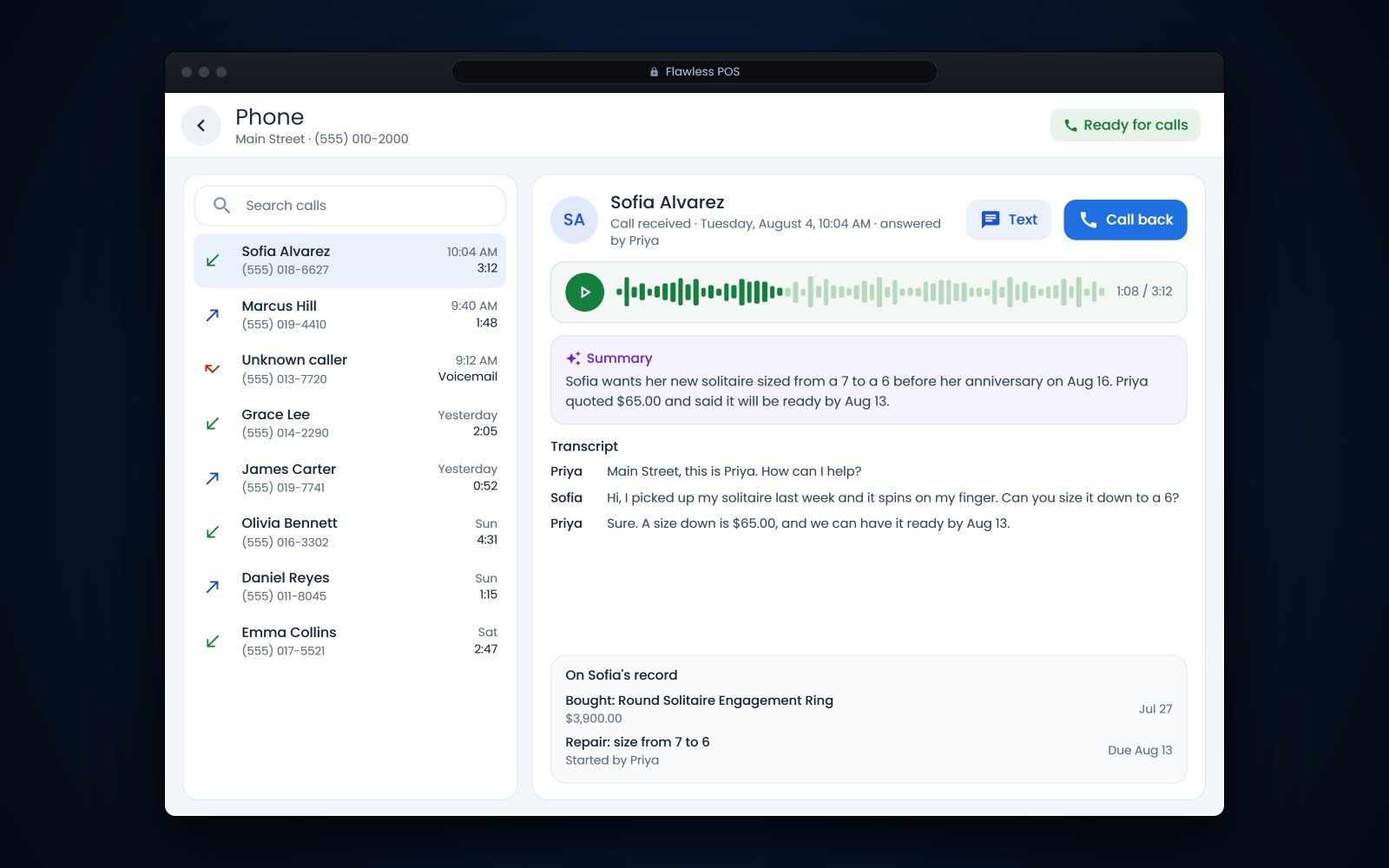
Short answer: A good phone system for jewelry store calls and texts puts your store number on every counter computer and staff phone, keeps conversations where the whole team can see them and saves the history to the customer's record. Look for call transcripts and summaries, a clear way to get consent for recording, and help keeping your existing number. Roll it out in stages and retire personal cell numbers for store business.
In this article
- The trouble with personal cell numbers
- Choosing a phone system for jewelry store calls and texts
- Business texting for jewelers needs registration and consent
- Call recording, transcripts and consent
- Keeping your store number when you switch
- A rollout plan for your store
- How Flawless POS handles store calls and texts
- Frequently asked questions
The trouble with personal cell numbers
For example, a bridal customer has been texting Sam, your best salesperson, for 3 months about a custom halo. Sam takes a job across town. The texts, the photos of the sketch, the ring size and the conversation about the deposit all leave with Sam's phone.
- History leaves with the employee. Nobody else can see what was promised, quoted or agreed.
- Customers get split conversations. One person texts the salesperson's cell, their spouse calls the store line, and nobody knows both happened.
- Late-evening texts land on a personal phone. Staff feel they have to answer at 10 p.m., or they don't, and the customer waits.
- Consent lives in the wrong place. A customer who texts STOP to a personal phone has opted out on a device the store never sees.
- Privacy is harder to protect. Photos of a customer's ring, home addresses and payment talk sit on a phone the store does not control.
A store phone system deals with most of this by putting calls and texts on the store's own number, with the history kept where the whole team can see it. Repair calls get easier too, because the person answering can see the job and the last conversation at the same time, especially if your jewelry repair software and your phones share the same customer record.
Choosing a phone system for jewelry store calls and texts
Business phone options run from a single desk line to software that works on every computer and phone in the store. For a jewelry store, these are the parts that matter.
| Feature | Why it matters at a jewelry counter | Question to ask |
|---|---|---|
| Your store number on computers and phones | Staff can call or text from the counter, the office or the bench, and the customer always sees the store's number | Does a call from a staff phone show the store number or the employee's own number? |
| One shared place for texts | Anyone on shift can answer the repair question with the full conversation in front of them | Can several people see the same conversation, and can I tell who replied? |
| History on the customer record | The salesperson sees the last call, the last text and the last purchase together | Do calls and texts attach to the customer automatically, or does someone have to file them? |
| Transcripts and summaries | A manager can check what was promised on a call without listening to all of it | Where are transcripts kept, who can read them, and how do we handle consent? |
| Greetings, hours and routing | Calls ring the right people during the day and reach a greeting after hours | Can we change the greeting and the hours ourselves? |
| Texting from your website | Customers who would rather text than call can reach you from your site | Do website texts land in the same place as other texts? |
| Keeping your number | Your number is already on receipts, ring boxes and your Google listing | Can you move my existing number, and what happens to calls during the move? |
Ask to see each one working on a real call during the demo. Watching a call come in, get answered at the counter and show up on the customer's record tells you more than any feature list.
Business texting for jewelers needs registration and consent
Once texts come from your store number through software, carriers treat them as business messages, even when a salesperson is typing to one customer. CTIA's Messaging Principles count any message sent by a business, or by someone acting for one, as business messaging. That has 2 practical effects.
- Registration. Texts from a local 10-digit number go through A2P 10DLC registration with The Campaign Registry (opens in a new tab), which verifies brands and their messaging providers before they can send. Your provider files the brand and campaign registrations for you, so ask how long approval takes and start early.
- Consent. Replying to a customer who texted you first is conversational. Repair updates need the customer's permission for that purpose, and promotional texts need written consent. Our guide to texting rules, consent and 10DLC covers the details, including quiet hours.
Move existing conversations over gently. A short text from the old cell, such as "From now on you can reach me and the team at our store number, (number)," tells the customer where to go. Send the thank-you and care-tip messages from your customer follow-up plan from the store number too.
Call recording, transcripts and consent
Transcripts and summaries can save a lot of time. A manager can see that a customer was promised a pickup on a certain day, or what was quoted for a resize, without playing back the whole call. They also come with rules. Call recording and transcription require appropriate consent.
Federal law allows recording when one party to the call consents (18 U.S.C. 2511(2)(d) (opens in a new tab)), but some states require everyone's consent. Florida allows interception only when all parties have given prior consent (Fla. Stat. 934.03 (opens in a new tab)). Washington requires the consent of all participants and treats it as given when the recording is announced and the announcement is recorded too (RCW 9.73.030 (opens in a new tab)). Your callers may be in another state, so the simplest approach is to follow the strictest rule on every call. This is not legal advice; check your state's rules.
- Start the greeting with a plain notice, such as "Calls may be recorded and transcribed so we can keep good notes on your order."
- Have staff say the same thing at the start of outbound calls.
- Never take card numbers over a recorded line. Use the card terminal or another secure way to pay.
- Decide who can read transcripts and how long you keep them.
Keeping your store number when you switch
Your phone number is on your website, your Google listing, your ring boxes and years of receipts. You should not have to give it up to change systems. FCC rules require carriers to complete a simple port within 1 business day and other ports within 4 business days (47 CFR 52.35 (opens in a new tab)). Ask your new provider whether your number qualifies as a simple port and how long yours will take.
- Find out who your current carrier is, and get the account number, the PIN or passcode, and the name and service address exactly as they appear on the bill.
- List every number you use: the main line, a fax line, a second store, any number printed on old ads.
- Do not cancel the old service yourself. Let the port finish first, then close the account.
- Pick a quiet day for the switch, and test calls and texts to the number as soon as the port completes.
If you only want to add texting to a number you already have, ask about text-enabling it. CTIA's principles call for a check that the business really holds the number before texting is turned on, so expect a little paperwork.
More questions for any phone vendor
- Can you move my existing number, and what do you need from me?
- Who files the 10DLC registration, and how long does approval usually take?
- What happens to calls if our internet goes down?
- Can I export my call and text history if I leave?
- Is there a contract term or a fee to leave?
- Who do I call when a phone stops ringing, and how quickly do they answer?
A rollout plan for your store
- Week 1: decide and orderChoose the system, list your numbers, and start the port and the texting registration. Both take time, so start them first.
- Week 2: set it upRecord the greeting with the recording notice, set your hours, and decide whose phones ring for sales, repairs and the office. Add the app to staff phones and sign in on the counter computers.
- Week 3: train with real callsHave each person answer a call, send a text, find an old conversation on a customer record and transfer a call. Plan on about 10 minutes per person.
- Week 4: switch overMove the number, text your regular customers from the store number, and ask staff to stop using personal phones for store business.
- After 30 days: reviewRead a sample of transcripts, look for missed calls and unanswered texts, and fix the greeting or routing wherever callers got stuck.
Tip: Write the rule down: store business happens on the store number. Put it in the employee handbook so nobody has to guess.
How Flawless POS handles store calls and texts
Flawless POS includes a store phone system, so calls and texts run on your business number instead of staff cell phones. Staff can call and text customers from a computer, using the phone built into Flawless, or from the Flawless app on their phone, and the customer sees the store number either way. Texts, email and web chat come into one inbox.
Each call's summary and transcript appear next to the call and on the customer's record. Call recording and transcription require appropriate consent.
Flawless also offers an AI receptionist that answers calls and gives repair status.
It allows me to run all aspects of my business from anywhere in the world.
To watch a call come in and land on a customer record, book a demo.
Frequently asked questions
Can we keep our current store phone number?
Usually, yes. FCC rules require carriers to complete simple ports within 1 business day and other ports within 4 business days. Keep the old service active until the port is done, and have your account number, PIN and the exact name and address from your bill ready.
Do we have to tell customers that calls are recorded or transcribed?
In some states, yes. Federal law allows recording with one party's consent, but Florida and Washington, among others, require the consent of everyone on the call. A short notice at the start of every call covers callers wherever they are. This is not legal advice; check your state's rules.
Can staff use the store number from their own cell phones?
With many systems, yes, through an app that places calls and texts from the store number. The conversation then stays on the customer's record instead of the employee's phone. Ask any vendor to show you what the customer sees when a staff member calls from the app.
Do one-to-one texts from the store need 10DLC registration?
In most cases, yes. CTIA treats messages sent by a business as business messaging even when they go to one customer at a time, and texts from a local number go through A2P 10DLC registration. Your phone or texting provider files it for you.
Sources
- 18 U.S.C. 2511 - Interception of communications (one-party consent) (opens in a new tab)
- Florida Statutes 934.03 - Interception of communications (all-party consent) (opens in a new tab)
- Washington RCW 9.73.030 - Recording private communications (consent of all participants) (opens in a new tab)
- 47 CFR 52.35 - Porting intervals for telephone numbers (opens in a new tab)
- CTIA - Messaging Principles and Best Practices (May 2023) (opens in a new tab)
- The Campaign Registry - 10DLC overview (opens in a new tab)