
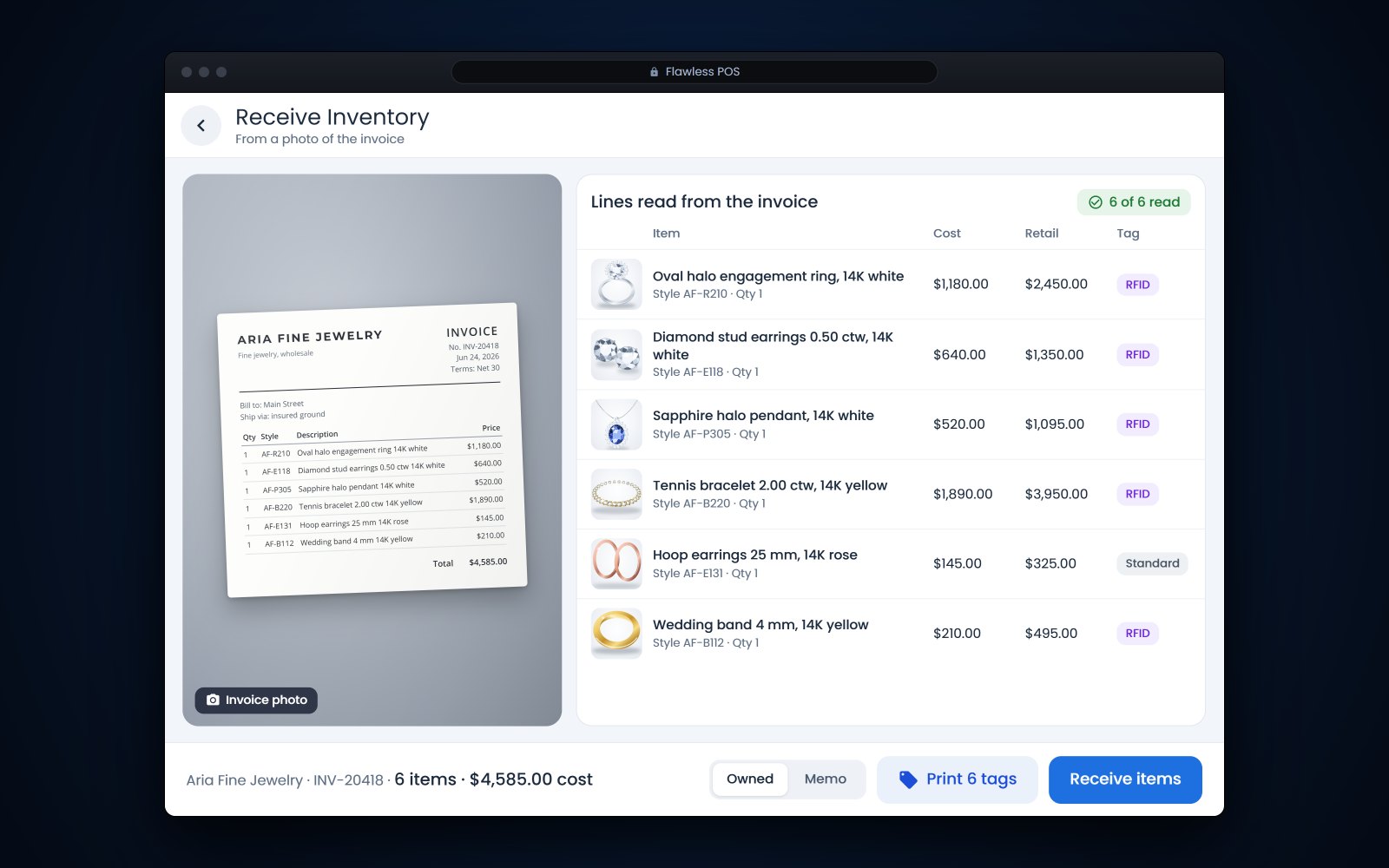
Short answer: Receiving inventory in a jewelry store means checking every piece against the vendor's invoice and your order before it goes into stock: count it, weigh it, match any lab report, enter cost and retail, mark it owned or memo, then tag it, photograph it and list it. AI can now read the invoice and fill in the lines for you. A person still has to compare the pieces in hand with those lines, because an invoice only tells you what the vendor says it shipped.
In this article
- Set up a receiving spot before you open the box
- Receiving inventory in a jewelry store, step by step
- Check grading, lab reports and disclosures
- Mark owned and memo pieces before tagging
- Common receiving mistakes
- Where AI helps with vendor invoices, and what a person still checks
- How Flawless POS handles receiving
- Frequently asked questions
Set up a receiving spot before you open the box
For example, a vendor box sits on the back counter for 2 days because nobody had time to check it in. Meanwhile a customer asks for a pendant that is in that box, and nobody can sell it because it is not in the system yet.
Pick one spot away from the sales floor and keep it set up: a scale, a loupe, a millimeter gauge, a tag printer, good light for photos and a sealed bin for anything waiting on a question. Make it a rule that shipments are received the day they arrive, and that 2 people open anything high-value.
Tip: Some stores film the opening of every insured package, with the label and the seal in view. If a piece is missing, that recording supports a claim with the carrier or the vendor.
Receiving inventory in a jewelry store, step by step
Use the same order every time, and finish each shipment before you start the next one.
- Match the invoice to your orderCheck each line against what you ordered: style, quantity, metal, size and cost. Flag anything you did not order and anything that is missing.
- Count pieces and stonesCount the pieces, then count the stones in each piece against the description. "1 round center and 24 round side stones" means 25 stones.
- Weigh each pieceRecord the gram weight and compare it with the invoice when the vendor lists one. Gold priced by weight should match.
- Check metal, markings and disclosuresLook for the karat stamp and maker's mark, and confirm whether stones are natural or laboratory-grown and whether any treatment is listed.
- Match lab reports to stonesCompare each report with its stone, including weight, measurements and any inscription on the girdle. There is more on this below.
- Enter cost and retailUse the invoice cost and your own pricing rules. Decide with your accountant whether freight and insurance go into cost, and do it the same way every time.
- Mark it owned or memoMemo pieces need the vendor, the memo terms and the return date on the record before they are tagged.
- Tag itPrint the tag from the item record, RFID or standard, and attach it so it hangs free of the metal.
- Photograph itTake your product photos now, while the piece is clean and in your hand.
- Put it onlineList it on your website with the same details, so the site and the case match.
Tell the vendor about shortages, damage or wrong items the same day, in writing, and check your vendor's terms for how long you have to report a problem.
Tagging at receiving is also what keeps later counts honest, as we explained in our guide to RFID for jewelry stores. And if you sell online, the last step is easy to put off; our guide to syncing your website with inventory explains why a piece should go online from the same record as the case.
Check grading, lab reports and disclosures
A lab report is only useful if it belongs to the stone in front of you. GIA's guide to reading its diamond grading reports lists the details to compare: the report number, shape and cutting style, measurements, carat weight to the nearest hundredth, color and clarity grades, any inscription on the girdle, and the comments, which is where a detected treatment such as laser drilling is noted (GIA (opens in a new tab)). The same guide says the report's QR code, when scanned, verifies the report's data against GIA's database.
Look up the report number on GIA's Report Check and read the inscription under a loupe. Then compare the details as well as the number. In one case described in GIA's Gems and Gemology journal, a treated diamond carried a counterfeit inscription that pointed to the report of a different, untreated stone, and the mismatch showed when the lab compared the stone's details with that report (GIA Gems and Gemology, 2021 (opens in a new tab)).
Lab-grown and treated stones
Receiving is the moment to get the description right, because whatever you enter ends up on the tag, the receipt and the website. The FTC's Jewelry Guides say the name of a laboratory-grown stone should be immediately preceded, just as clearly, by a word like "laboratory-grown" or "laboratory-created" (section 23.25), and that a gemstone treatment should be disclosed when it is not permanent, creates special care needs or significantly affects value (section 23.24, and section 23.14 applies the same rule to diamonds) (eCFR, 16 CFR Part 23 (opens in a new tab)). If the invoice is unclear, ask the vendor before you tag the piece. This is general information, not legal advice.
Mark owned and memo pieces before tagging
A memo piece looks exactly like one you bought. If it is received as owned stock, it ends up in your inventory value, your reorder reports and maybe your markdowns. Decide at receiving, and make the difference visible.
- Record the vendor, memo number, terms and return date on the item.
- Use a separate tag color or a clear mark on the tag for memo goods.
- Keep memo goods in their own trays where you can.
- Check memo returns and purchases against the vendor's memo statement every month.
Our guide to memo vs consignment covers who owns what and why those goods are counted apart.
Common receiving mistakes
| Mistake | What it causes | The fix |
|---|---|---|
| Tagging before checking | A tag with the wrong stone weight or metal | Check everything first, tag last |
| Receiving memo as owned | An inflated inventory value and wrong reorders | Mark memo at receiving, with its own tag color |
| Skipping the scale | No way to answer a later weight question | Weigh every piece and save the weight on the record |
| Trusting the report number alone | A report that belongs to another stone | Compare weight, measurements and inscription |
| Typing costs by hand with nobody checking | Typos that quietly change your margins | Check each cost against the invoice, then check the total |
| Leaving boxes for later | Pieces you cannot sell or count | Receive shipments the day they arrive |
| Saving photos for later | Pieces that never make it online | Photograph as part of receiving |
Where AI helps with vendor invoices, and what a person still checks
Typing a long invoice is slow, and it is where a lot of receiving errors start. Jewelry invoice scanning, where AI reads a photo or PDF of the vendor's invoice, takes over that typing. A good invoice reader pulls the vendor, style numbers, descriptions, metal, stone weights, quantities and costs off the page and turns them into lines ready to receive.
What it cannot do is look inside the box. A person still checks:
- That every line matches a piece in hand, and every piece matches a line.
- The numbers that change value: carat weights, karat, gram weights and costs.
- That the lines add up to the invoice total.
- Lines the AI may have split, merged or skipped, especially on long or handwritten invoices.
- Whether the paper is an invoice or a memo, and whether stones are natural or laboratory-grown.
- Your retail prices, which should come from your own rules and not from the vendor's paperwork.
For example, an invoice line for a pair of earrings at 0.50 carats total weight could be read as 2 pieces at 0.50 carats each. That is an easy catch for a person holding the earrings and a hard one for software reading a photo.
How Flawless POS handles receiving
Flawless POS can now build a receive from the vendor's invoice. In Flawless on the web, upload a photo or a PDF of the invoice, or text a photo of it to your store number, and Flawless reads it into a receive that your team reviews before anything goes into stock.
GIA reports can be synced to the item, and Flawless prints RFID or standard tags. Every move after receiving, including transfers between stores, is kept in the item's audit history. AI product photos can turn your own shots of a new piece into e-commerce photos and model shots, and because the website is synced with inventory, the piece you just received can go online from the same record.
It has truly changed our business and has allowed us to process a lot of one of a kind, unique sku's with less work than other platforms.
See how tagging fits in on our RFID jewelry inventory page, or book a demo and bring a recent vendor invoice.
See also: Jewelry inventory software.
Frequently asked questions
Should we receive inventory the day it arrives?
Yes, when you can. A piece in an unopened box cannot be sold or counted, and problems are easier to raise with the vendor while the shipment is fresh. If you cannot finish, log the box as received and keep it sealed until you do.
Can AI receive an invoice without anyone checking it?
It should not. AI is good at reading the lines off an invoice, but it cannot see the pieces in the box. Someone still needs to count, weigh and compare each piece with its line before it goes into stock.
How do we check that a lab report matches the stone?
Look up the report number on GIA's Report Check, then compare the report's details with the stone: weight, measurements, shape and any girdle inscription read under a loupe. A matching number alone is not enough, since inscriptions can be faked. If anything does not match, set the stone aside and call the vendor.
Do memo pieces need tags too?
Yes. Tag them so they can be sold and counted, but mark them as memo with a different tag color or a clear mark, and record the vendor and return date. That keeps them out of your owned inventory value and makes memo returns easy to find.
Sources
- eCFR - 16 CFR Part 23, Guides for the Jewelry, Precious Metals, and Pewter Industries (opens in a new tab)
- GIA - How to Read a GIA Diamond Grading Report (opens in a new tab)
- GIA Gems and Gemology - HPHT-Processed Diamond with Counterfeit GIA Inscription (2021) (opens in a new tab)
- GIA - Natural Diamond Grading Reports and Services (opens in a new tab)