
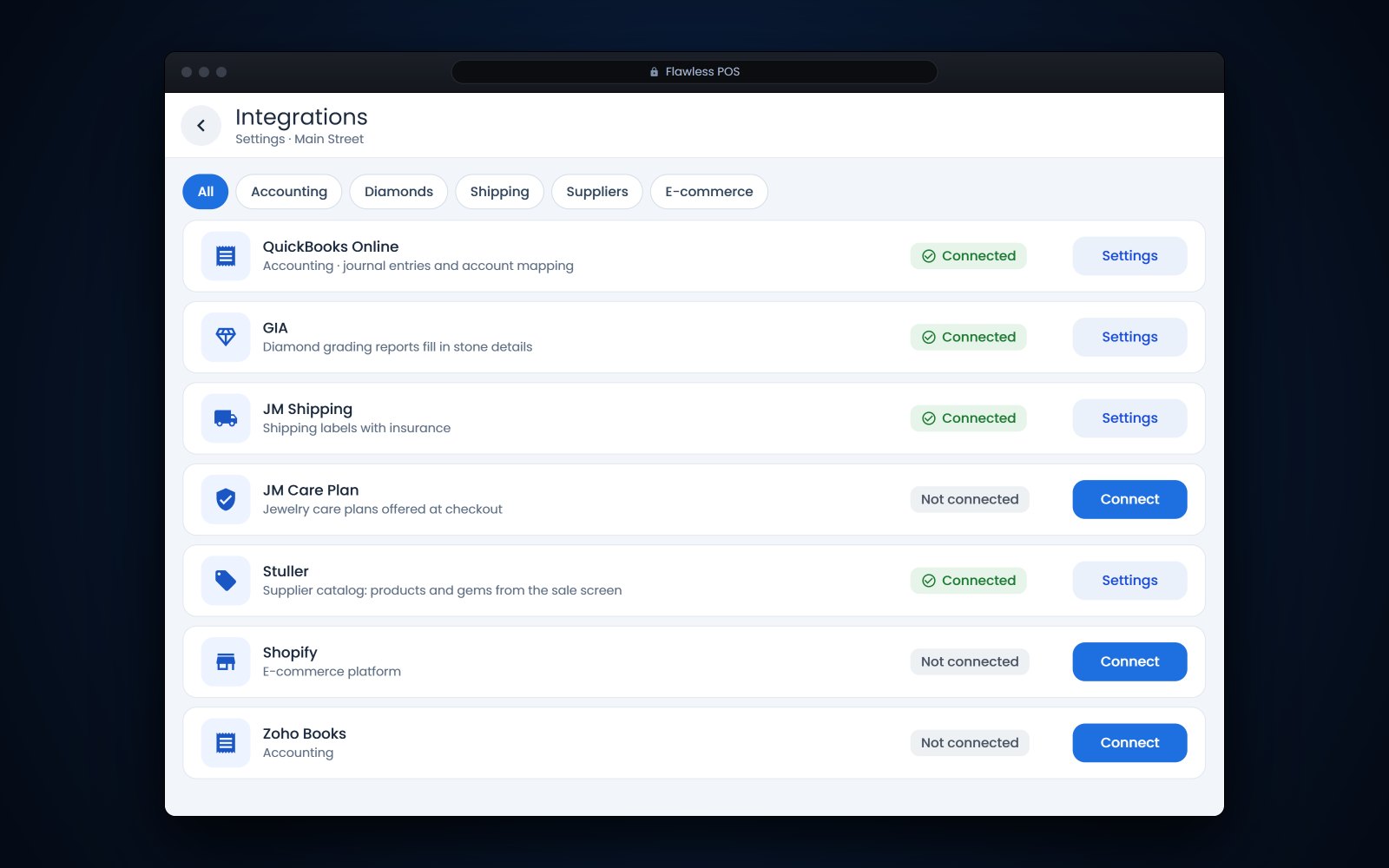
Short answer: Jewelry POS integrations connect your point of sale to the other systems your store already uses, so a sale, a diamond report or a shipping label is entered once instead of two or three times. For most stores the list starts with accounting, GIA and IGI reports, insured shipping, care plans, supplier catalogs such as Stuller, a repair price book and the online store, plus EDI for wholesalers. Before you depend on any of them, ask which way the data moves, when it moves and who fixes it when it breaks.
In this article
- Why jewelry POS integrations matter
- QuickBooks for jewelry stores: what should post to the books
- Checking GIA and IGI reports and keeping them with the item
- Jewelers Mutual shipping and care plans
- Stuller and repair price books
- Shopify, your online store and EDI for wholesalers
- Questions to ask about any integration
- Integrations in Flawless POS
- Frequently asked questions
Why jewelry POS integrations matter
Take one bridal sale on a Saturday. The ring is rung up in the POS. Someone types the GIA report number into a spreadsheet, registers the care plan on another website and makes a shipping label for the matching band on a carrier site. On Monday the bookkeeper enters the sale again in QuickBooks. That is one sale typed into 5 places.
An integration moves that information for you. It takes out the retyping, which is where report numbers get transposed and care plans get forgotten. It will not fix a messy process, so settle the process first and then connect it.
| What it connects | Examples | What should move | Ask about |
|---|---|---|---|
| Accounting | QuickBooks, Zoho Books | Daily sales, tax, payments, deposits and cost of goods as journal entries | Summary or detail, and how voids and returns post |
| Diamond reports | GIA, IGI | Grading details and a copy of the report onto the item | Which fields fill in, and whether they refresh |
| Shipping and insurance | JM Shipping Solution, Parcel Pro | Address, declared value and tracking number on the sale or memo | What the insurance covers and who files a claim |
| Care plans | JM Care Plan | The plan on the receipt, registered with the provider | How registration and claims work |
| Supplier catalogs | Stuller | Products, gems and prices you can quote at the counter | How current prices are and how orders are placed |
| Repair pricing | Geller's Blue Book | Repair prices in your repair menu | How updates arrive and how you adjust prices |
| Online store | Shopify and other platforms | Products, prices, availability and online orders | Which side owns each field |
| Wholesale partners | EDI (X12) | Purchase orders in; acknowledgments, ship notices and invoices out | Which documents each partner requires |
QuickBooks for jewelry stores: what should post to the books
If your accountant works in QuickBooks, the question is how each day's activity gets from the POS into the books without anyone retyping the end-of-day report.
A common approach is a daily journal entry that sums up sales, sales tax, payments by type and cost of goods, posted to accounts your accountant chooses. QuickBooks describes a journal entry as a manual transaction used to adjust balances or move money between accounts, and the debits must equal the credits. An integration builds that entry from the POS, so the books match the register.
Jewelry lines to settle with your accountant
- Deposits on special orders, custom work and layaways, which your accountant may want held as a liability until the piece is picked up.
- Gift cards and store credit, which you owe customers until they are used.
- Trade-ins and gold bought over the counter.
- Memo goods, which are not your inventory. Our post on memo vs consignment explains why they stay separate.
- Repairs and other services, which may need their own income account.
Map these once, before the first entry goes over, and review the first month together. QuickBooks itself advises consulting your accountant when you are unsure which accounts belong on each side of an entry. This is general information, not accounting advice.
Checking GIA and IGI reports and keeping them with the item
Anyone with a valid report number can use GIA's Report Check to confirm that the information on a report matches what GIA has archived in its database. IGI offers its own online lookup for IGI reports.
For businesses, GIA offers the Report Results API, designed for producers, manufacturers, wholesalers, traders and retailers that want grading results downloaded into their own systems. It requires a GIA laboratory account, and it returns the grading details and measurements and, for most report types, a PDF copy of the report.
In the store, a good connection means you enter the report number and the item fills in its carat weight, color, clarity and measurements, with the report attached. The tag, the website and any appraisal then show the same details. Our guide to receiving jewelry inventory shows where this fits when new goods arrive.
Tip: A database match confirms the report. It does not prove the stone in your hand is the one on the report, so if the diamond is inscribed, check the inscription under magnification first.
Jewelers Mutual shipping and care plans
Insured shipping
Jewelers Mutual's JM Shipping Solution is built for businesses that ship valuables. According to Jewelers Mutual, you enter the package details, review quotes from major carriers, print the label, add insurance in the same step and track every shipment from one dashboard, with address validation to catch mistakes. Parcel Pro, part of UPS, also offers insured shipping for high-value parcels.
Connected to the POS, a shipment should start from the sale or the memo: the address is already there, the declared value comes from the item, and the tracking number comes back to the record. Ask your insurer what your own policy covers in transit. Jewelers Mutual notes that its coverage depends on underwriting approval and policy terms.
Care plans
The JM Care Plan is a protection plan that customers buy through their jeweler, ideally at the same time as the piece. Jewelers Mutual lists jewelry repairs such as broken or worn prongs, ring resizing, replacing chipped stones, rhodium plating and broken clasps and chains, with separate options for watches, and says exclusions apply. Claims start with the jeweler, and the receipt is the proof of purchase.
That makes the POS the right place for it. The plan should go on the sale as its own line, get registered without a second form, and show on the customer's record when the ring comes back for a prong repair.
Stuller and repair price books
Supplier catalogs
Stuller was founded in 1970 in Lafayette, Louisiana, and supplies jewelry professionals with mountings, findings, metals, diamonds, gemstones, tools and packaging, along with bridal and fine jewelry. Its API offers product data with real-time pricing and availability, plus ordering and order status. For listings, Stuller recommends downloading and storing product data instead of loading it live.
At the counter, a catalog connection lets you show a customer a mounting or a center stone you do not stock, quote it at your price and turn it into a special order with the vendor's item number already filled in.
Repair price books
Geller's Blue Book is the repair pricing guide David Geller first wrote in 2000. In 2018, JCK reported that most jewelers see it as the definitive pricing guide for repairs, and Geller revises it every couple of years. Loaded into the POS, a price book means the counter quotes the price the bench expects, and a second prong or a bigger sizing is priced by the book instead of from memory. Our jewelry repair software page covers quoting and tracking the job itself.
Shopify, your online store and EDI for wholesalers
Shopify and other e-commerce platforms
If you sell online through Shopify or another platform, the integration's main job is to make sure the website only offers what is in your cases. For a one-of-a-kind estate ring, the listing has to come down when it sells in the store. Decide which system owns each field, often the POS for price and quantity and the website for online descriptions, and ask how online orders come back into the POS. Our guide to syncing your website with inventory goes into detail.
EDI for wholesalers
If you wholesale to larger retailers, some will send orders by EDI, using standards from X12. A purchase order arrives as an X12 850, and a partner may also expect an 855 acknowledgment, an 856 ship notice and an 810 invoice. An EDI connection should turn each incoming order into a sales order without anyone retyping style numbers. Our wholesale jewelry software guide covers the rest of the wholesale flow.
Questions to ask about any integration
Ask these in the demo, and ask the other company as well, since both sides have to support the connection.
- Which way does data move: one way, or both ways? If both, which side wins when they disagree?
- Exactly which fields move, and which do not?
- When does it run: right away, on a schedule, or when someone clicks a button?
- What happens to a void, a return or an edited sale after it has already been sent?
- Do I need my own account with the other company, and does it cost extra on their side?
- Is there a log where I can see what was sent and what failed?
- Who fixes it when it breaks, and how will I find out?
- What happens to my data if I stop using it?
Tip: Before you buy anything, spend a week noting every time someone types the same information into two systems. Start with whatever shows up most.
Integrations in Flawless POS
Flawless POS works with Shopify and other big platforms, QuickBooks, GIA, JM Shipping, JM Care Plan and IFS (InForSure) shipping insurance. Recent additions include:
- QuickBooks: push journal entries in one click, using your own account mapping. Zoho Books is supported as well.
- GIA and IGI: refresh report details in bulk and fill in blank stone details from the report. GIA reports stay synced to the item.
- Shipping: choose JM Shipping or ShipEngine for each label, ship with Parcel Pro, or hold a package at a carrier location.
- Stuller: browse and add Stuller products and gems from the sale screen.
- Repairs: import Geller's Blue Book repair pricing, with quantity tiers.
- Wholesale: EDI orders from trading partners arrive in an inbox and import as sales orders.
Flawless works alongside your accounting system and your Shopify store. To see the connections you would actually use, book a demo.
See also: Jewelry store management software.
Frequently asked questions
What is the difference between a one-way and a two-way integration?
A one-way integration sends data in one direction, for example sales from the POS to QuickBooks. A two-way integration lets a change on either side update the other, which raises a question to settle up front: when the two systems disagree, which one is right? Ask to see both directions working before you count on it.
Do I need an integration to check a GIA report?
No. GIA's Report Check lets anyone with a valid report number confirm the report's details on GIA's website. An integration saves the retyping and keeps the details and a copy of the report with the item.
Who should set up the QuickBooks account mapping?
Your accountant or bookkeeper, working with someone from the store who knows how deposits, layaways, gift cards and trade-ins are handled at the counter. Set it up before the first entry is sent and check the first month's entries together. This is general information, not accounting advice.
What does an integration cost?
It depends on both sides. Some POS systems include integrations and some charge for them, and the other company may require its own account, such as a carrier account, an accounting subscription or a GIA laboratory account for API access. Ask both companies before you sign.
What happens if an integration stops working?
Find out how you would know: an alert, an email or a log you can check. Ask who fixes it and how quickly, and keep a manual fallback, such as making labels on the carrier's site, for the day it is down.
Sources
- QuickBooks - Create journal entries in QuickBooks Online (opens in a new tab)
- GIA - Report Data Services (Report Check, Report Check Plus, Report Results API) (opens in a new tab)
- GIA - Report Results API (opens in a new tab)
- IGI - Verify Your Report (opens in a new tab)
- Jewelers Mutual - JM Shipping Solution (opens in a new tab)
- Jewelers Mutual - JM Care Plan (opens in a new tab)
- Parcel Pro - Insured shipping services (opens in a new tab)
- Stuller - Stuller celebrates 50 years in business (November 12, 2019) (opens in a new tab)
- Stuller - API documentation and examples (opens in a new tab)
- JCK - The Big Business of Jewelry Repairs (October 8, 2018) (opens in a new tab)
- X12 - Transaction Sets (opens in a new tab)