
Short answer: The spring 2026 Flawless POS updates, from late March through May, add 3 things stores could not do before. You can turn inventory photos into product shots, model photos and short videos, handle consultation requests from your website on one page, and add Stuller pieces from the sale screen. Smaller improvements cover the website builder, repair pricing, phones, integrations and a dark mode.
In this article
AI product photos and short videos from your inventory photos
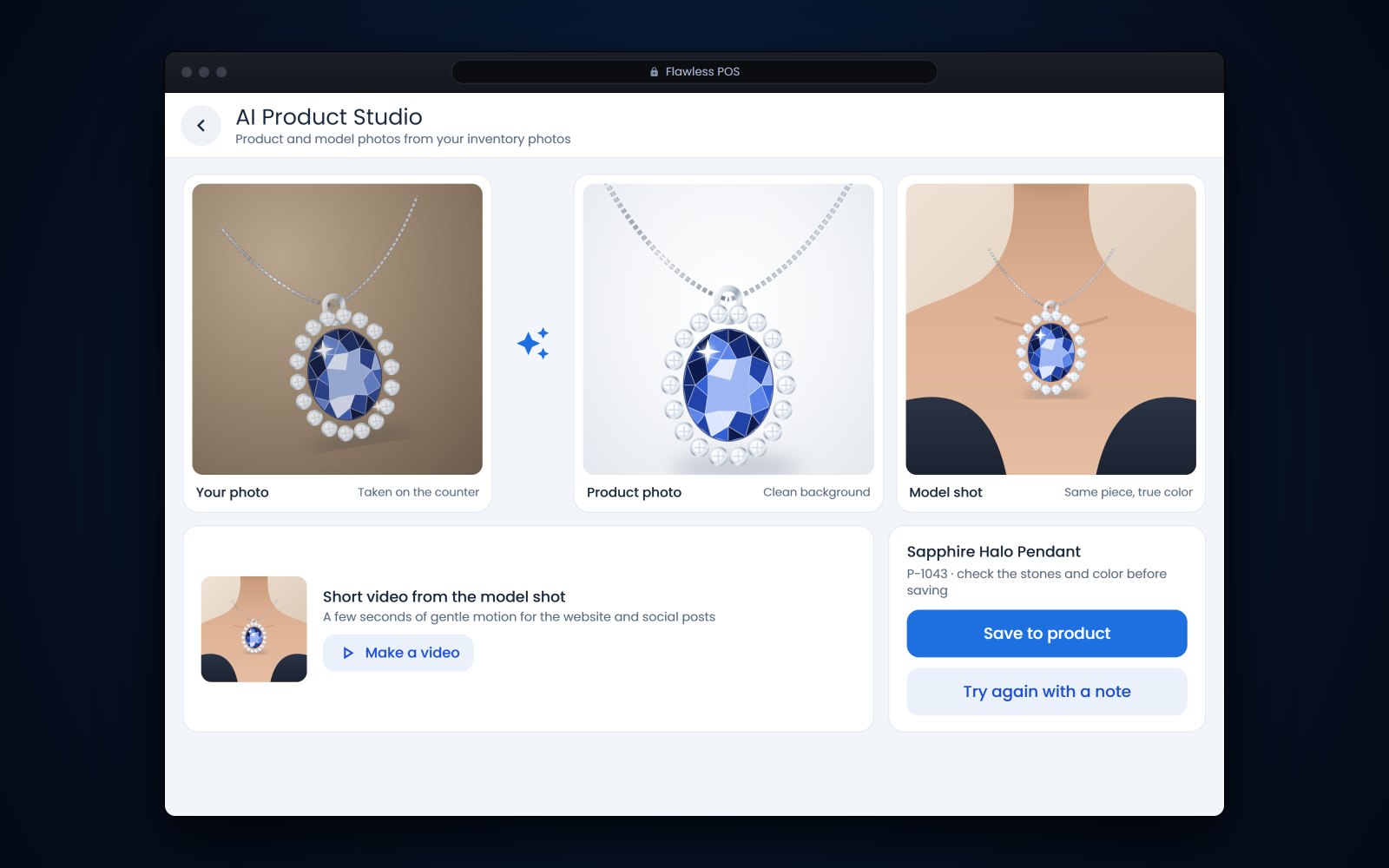
The new AI photo editor works from the photos already on a product. It can turn a quick shot taken at the counter into a clean e-commerce photo, or into a photo of the piece on a model. Pick a built-in scene, such as a white background, a soft shadow or a lifestyle setting, or save your own scenes with reference images so every photo matches your look. For model photos you choose the skin tone, hair color and age range.
If a result is close but not right, describe the change in plain words or pick a suggested tweak, and the editor adjusts the image without starting over. From a model photo you can also make a short video with gentle movement, horizontal or vertical, at 720p or 1080p, with motion styles made for rings, necklaces, earrings, bracelets and watches.
Where to find it: Products, from the photos on any product. Check each result against the piece before you save it, so the metal, the stones and the size stay true.
A Bookings page for website consultation requests
Consultation requests from your website scheduler now land on a new Bookings page. Each request shows the date and time the customer asked for, the service, their contact details and notes. Requests are sorted into tabs by status: Pending, Needs Store, Confirmed, New Time Proposed, Rejected, Cancelled, Completed and No-Show.
Your team can confirm a request, decline it, propose another time, assign a store or an associate, add internal notes, and later mark the visit completed or a no-show. Each change sends the customer the matching email and text. Confirmations include add-to-calendar links, a proposed time can be accepted or declined right from the email, and confirmed visits get a reminder the day before.
Where to find it: Online, then Bookings.
Add Stuller pieces right from the sale screen
If you buy from Stuller, connect your Stuller account once under App Connections, along with the default percentage you add to Stuller's cost and the categories you sell most. A Stuller Products tile then appears next to the product search on the sale screen.
It opens Stuller's catalog in 2 modes: Products, for rings, settings and finished jewelry, and Gems, for natural diamonds, lab-grown diamonds and loose gemstones. Search by SKU, description or serial number, filter by metal, center stone shape, size and stone family, and open any item for its photos, full specs, certificate and video. Add to Cart creates the item in your inventory, with the retail price worked out from that percentage, and puts it on the sale.
Where to find it: connect under Admin, then App Connections, and use the Stuller Products tile on the sale screen.
Spring updates with their own posts
- Trade-ins and scrap buys. Trade In now asks whether you want a detailed scrap, metal and stone buy or a quick product buy, and metal rows price from the live spot price by karat and weight. Read more in trade-ins and scrap gold at the counter.
- Calling clients from your cell. The clienteling app can place calls over the cell network while showing your store's number, and calls and texts from numbers you don't have yet now land in the activity timeline as a new customer you can fill in. Read more in calling clients from your cell without giving out your number.
More Flawless POS updates this spring
Website builder
- Version history with publish notes and a restore button.
- An SEO title, description and web address for every page, with AI help writing them.
- Generate all your pages at once, in the background.
- Built-in contact and consultation forms.
- Product blocks, such as carousels, slideshows, product lists and product details, plus a store-wide selling mode of Shop with a cart, Contact for Pricing, Wholesale or Get a Quote, which any page can override.
For what a store website should do with your inventory, see why your website should sell what's in your cases.
Repairs
- Import the Geller's Blue Book spreadsheet into your service catalog, with quantity tiers, so a job like 8 prongs is priced across the right tiers.
- See the labor, parts and other costs behind each tier before you add it.
- An optional rush charge. Admins set it once, and from May 19 staff can switch on Express Service when they pick a repair, which raises the labor portion only.
More on repair tracking in Flawless.
Phones
- Voicemail alerts now show who called, a transcript that separates the caller from your associate, and a short summary.
- The end-of-day digest email lists each call with its AI summary and a link to the recording, and closes with the day's in-store and online sales.
Call recording and transcription require appropriate consent.
Point of sale
- Light and dark mode. Each person picks a look, and it follows them from device to device.
Integrations
- A Sales and Inventory Feeds app shares your sales and inventory data with outside providers. Each provider gets its own access key and settings, including which vendors to include, whether to share customer details, and whether to include special orders and layaways. Remove a key to cut off access at once.
Getting these features in your store
The web features above are part of Flawless on the web, so there is nothing to install. A few need a one-time setup by an admin, such as connecting your Stuller account or creating a feed for an outside provider. Call us at (970) 471-7558 or email help@flawlesspos.com and we will help you set them up. If you're not on Flawless POS yet, book a demo.
Frequently asked questions
Do I need to install anything to get these updates?
No. They are part of Flawless on the web. Some need an admin to connect an account or create a feed first, such as Stuller or a sales and inventory feed.
Can I fix an AI photo that is almost right?
Yes. Describe the change in plain words or pick a suggested revision, and the editor adjusts the image without starting over. Before you save it, check that the metal, the stones and the size match the real piece.
Do customers get reminders for website consultations?
Yes. When you confirm a request, the customer gets a confirmation with add-to-calendar links. Confirmed visits also get a reminder by email and text the day before.
Can I suggest a different time for a consultation?
Yes. Propose a new time from the Bookings page, and the customer can accept or decline it from the email. The request moves to the New Time Proposed tab until they answer.