
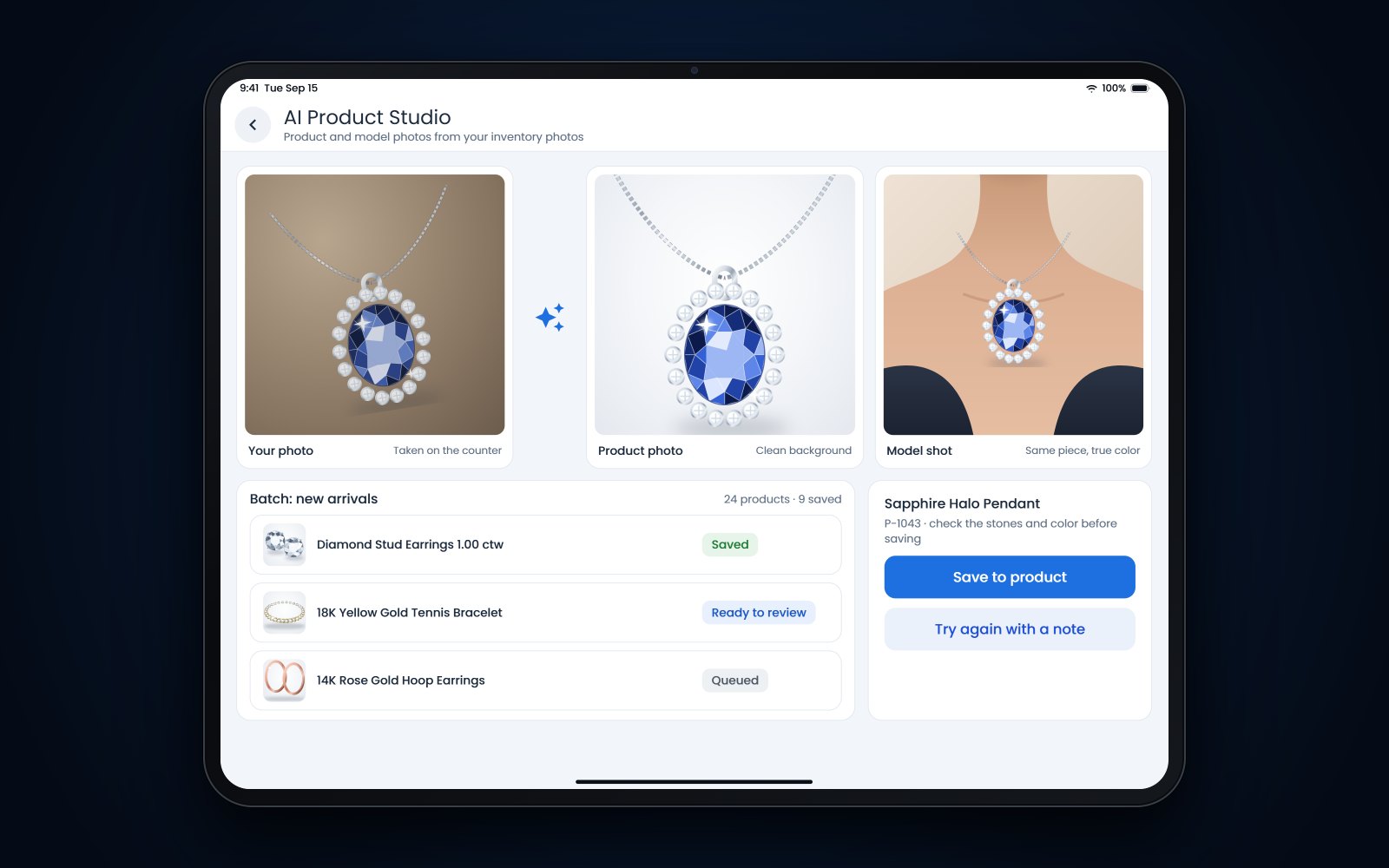
Short answer: AI jewelry product photography starts with a real photo of your piece and turns it into a clean catalog shot or a photo of the piece being worn. It works when the source photo is sharp and the AI changes only the background, the light and the setting, never the metal, stones, size or proportions. Compare every result with the piece in your hand before it goes online.
In this article
- Why photos do the selling online
- What a good jewelry product photo needs
- Shooting the source photo with a phone
- What AI jewelry product photography should and should not change
- Using model shots for scale and style
- A review checklist before anything goes live
- File names, alt text and a consistent look
- How Flawless POS handles product photos
- Frequently asked questions
Why photos do the selling online
In the store, a customer picks up the pendant, turns it under the lights and holds it to her neck in the mirror. Online, the photos have to do all of that. They answer what a shopper can't check for herself: how big the piece is, how it sits, what color the gold is and whether the stone has life in it.
Weak photos cost you twice. Shoppers scroll past them, and the ones who buy anyway can be surprised when the box arrives. Clear, consistent photos help on Google as well, which says sharp images look better in results and appeal to people more than blurry ones (image SEO best practices (opens in a new tab)).
A professional jewelry photographer is still worth paying for hero pieces and campaigns. The trouble is the daily flow of new arrivals, estate buys, custom work and restocks, and that is where AI photo tools help most.
What a good jewelry product photo needs
| Shot | What it shows | Tip |
|---|---|---|
| Front, on white or light gray | The piece as the main image | Fill most of the frame; Google suggests the product take up 75 to 90 percent of the image |
| Side or profile | Setting height, band width and depth | Shows how a ring sits on the finger |
| Back or clasp | Finish, hallmarks and clasp type | Shoppers look for this on chains and bracelets |
| Close-up | Stones, prongs and engraving | Only if the source photo is sharp enough |
| Worn on a model | Scale and style | Use it as an extra image, with a clean product shot as the main one |
Whatever the shot, keep the background, angle and lighting the same across your site so pieces can be compared side by side. A collection page where every ring sits at the same angle on the same white is easier to shop.
If you are listing these pieces on Google or Meta, the photo rules in our guide to Google Merchant Center for jewelry stores apply as well.
Shooting the source photo with a phone
AI can replace a background. It can't bring back detail the camera never captured. A good source photo decides how good the final image can be, and a phone is enough if you set it up well.
- Clean the pieceFingerprints, lotion and dust all show at close range. Wipe metal with a polishing cloth and stones with a lint-free cloth.
- Use soft, even lightA light box is ideal. Without one, work beside a window with indirect daylight and bounce light into the shadows with white card. Turn the flash off.
- Steady the phoneA small tripod or phone stand keeps the shot sharp and lets you repeat the same angle for every piece.
- Focus on the stoneTap the screen on the center stone to set focus. Move the phone closer instead of using digital zoom.
- Shoot more than you needTake the front, side, back and a close-up at your phone's full resolution, and keep the originals.
- Check color before you move onLook at the photo next to the piece. If yellow gold looks green or white gold looks yellow, fix the light now.
Size matters for the marketplaces too. Google has announced that the minimum for Merchant Center product images rises to 500 x 500 pixels on January 31, 2027 (2026 specification update (opens in a new tab)), and Meta catalogs already ask for at least 500 x 500 (catalog fields (opens in a new tab)). A full-resolution phone photo is far larger, so the real risks are cropping too tight and uploading thumbnails.
What AI jewelry product photography should and should not change
Let the AI change what surrounds the piece, and nothing about the piece itself.
| Fine for AI to do | Never let AI do |
|---|---|
| Replace or clean up the background | Change the metal color or the look of the karat |
| Even out the light and soften harsh reflections | Add, remove or move stones |
| Remove dust specks from the backdrop | Change a stone's color, clarity or cut |
| Match a set of photos to one style | Make a stone or the piece look bigger |
| Place the piece on a model or in a setting | Add engraving, milgrain or details that aren't there |
| Straighten and center the piece | Hide wear or damage on an estate piece |
This goes beyond taste. The FTC's Jewelry Guides treat misrepresenting a piece's color, quality, size or treatment as deceptive, and they warn that a depiction of a diamond or gemstone that shows it larger than its actual size may mislead (16 CFR 23.1 (opens in a new tab)). Google's rules say the main product image must clearly show the exact item being sold (image requirements (opens in a new tab)). This is general information, not legal advice.
Label AI images where marketplaces ask you to
Google Merchant Center requires images made with generative AI to carry metadata that marks them as AI-generated, and tells merchants not to strip it (AI-generated content (opens in a new tab)). Ask whoever makes your AI photos whether that tag is kept, and don't run the files through an editor that removes metadata before they reach your feed.
Using model shots for scale and style
On a white background, a pendant could be 10 millimeters across or 30. On a model, a shopper sees the size at once. Model shots also show how a piece might be worn, like a layered chain with a sweater or a pair of studs with the hair pulled back.
They need the most checking, because the AI is drawing a whole person around your piece:
- Size. The piece should be in proportion to the hand, ear or neck. A 1 carat solitaire should not look like a 3 carat one.
- Placement. Rings sit on a finger instead of floating, and earrings sit where real earrings sit.
- Length. A 16 inch chain should not hang like a 24 inch one.
- Hands and skin. Look for extra fingers, warped nails and skin that looks like plastic.
Keep a clean product shot as the main image and use model photos as extra images. Google calls these lifestyle images and allows up to 5 per product, each at least 600 x 600 pixels and free of promotional text (lifestyle images (opens in a new tab)).
A review checklist before anything goes live
Check every AI photo against the piece itself, not only against the source photo. Someone who knows the piece should sign off before it is saved.
- Metal color matches the piece in hand
- Stone count, shape and color are unchanged
- Prongs, bezels and settings look the same
- The piece is shown at its real size
- No added text, logos, watermarks or borders
- Background matches the rest of the site
- Model shot is in proportion, with normal hands and features
- File name and alt text written before upload
File names, alt text and a consistent look
Search engines can't see your photos the way a shopper does. They read the file name, the alt text and the words around the image. Google suggests short, descriptive file names and alt text that describes the image specifically, and it warns that stuffing alt text with keywords can make a site look like spam (image SEO best practices (opens in a new tab)). For people using screen readers, the W3C suggests a short phrase or sentence that gets across what the image shows (informative images (opens in a new tab)).
| What | Weak | Better |
|---|---|---|
| File name | IMG_4521.jpg | oval-sapphire-halo-ring-14k-yellow-gold-front.jpg |
| Product shot alt text | ring | Oval blue sapphire halo ring in 14K yellow gold, front view |
| Model shot alt text | model | Oval sapphire halo ring worn on a model's left hand |
| Keyword-stuffed alt text | sapphire ring sapphire rings best sapphire ring cheap | Oval sapphire ring with a diamond halo, side view showing the band |
Name and describe each photo when it's created, as part of receiving new inventory or listing it. Doing 300 images in one sitting is how alt text gets skipped. The same goes for your own website, where the photo, the price and the stock status should all describe the same piece, as we covered in keeping your website in step with your cases.
How Flawless POS handles product photos
Flawless POS includes AI Product Studio, which turns the photos on an item into e-commerce product photos, with model shots included, in about 5 minutes. You can also run a batch of products at once and make e-commerce and model photos together, which suits a week of new arrivals.
Your Flawless website is synced with your inventory, so the item you photograph is the item your website shows. The checklist above still applies: whatever tool makes the photo, a person who knows the piece should approve it.
The AI features are practical rather than gimmicky.
We covered batch photos in our roundup of recent Flawless updates. To try it on your own pieces, book a demo.
See also: Jewelry website and online store and AI jewelry photography.
Frequently asked questions
Is it honest to use AI photos to sell jewelry?
Yes, as long as the piece in the photo is the piece you sell, with the same metal, stones, size and color. Changing the background or showing the piece on a model is presentation. Changing the piece itself misrepresents it, and the FTC's Jewelry Guides treat misrepresentation as deceptive.
Do I still need a professional photographer?
For hero images, campaigns and your most expensive pieces, a photographer who knows jewelry is still worth it. AI tools fit the everyday flow of new arrivals and restocks, where waiting for a photo shoot means pieces sit online without good photos.
Should a model photo be the main image?
Usually not. Google wants the main image to clearly show the exact product, and shoppers comparing pieces expect a clean product shot first. Use model photos as extra images, which Google calls lifestyle images.
What size should jewelry photos be?
Shoot at your phone's full resolution and keep the original. Google's minimum for Merchant Center images rises to 500 x 500 pixels on January 31, 2027, Meta catalogs ask for at least 500 x 500, and Google's lifestyle images need 600 x 600. Bigger files also let shoppers zoom in on the stones.
Does Google accept AI-generated product images?
Google Merchant Center allows AI-generated images in product data, but they must carry metadata marking them as AI-generated, and the main image still has to show the exact item. Don't strip that metadata when you edit or resize the files.
Sources
- Google Search Central - Google image SEO best practices (opens in a new tab)
- Google Merchant Center Help - Image link attribute (opens in a new tab)
- Google Merchant Center Help - Lifestyle image link attribute (opens in a new tab)
- Google Merchant Center Help - AI-generated content (opens in a new tab)
- Google Merchant Center Help - Product data specification update 2026 (opens in a new tab)
- Meta for Developers - Catalog fields (opens in a new tab)
- FTC Jewelry Guides, 16 CFR 23.1 (deception, general) (opens in a new tab)
- W3C Web Accessibility Initiative - Informative images (opens in a new tab)