
Short answer: The summer 2026 Flawless POS updates, from June through August, add 5 new features. You can take in customer-owned pieces on consignment, send repair estimates that customers approve and pay from one link, let wholesale accounts pay invoices online, refund a return to the original card, and find or add a customer from a photo of a license or business card. Invoice scanning, calls from the computer, the AI receptionist, integrations and the AI website builder each got a post of their own.
In this article
- Take in customer-owned pieces on consignment
- Repair estimates customers approve and pay from one link
- Wholesale accounts can pay invoices online
- Refund a return to the original card
- Find or add a customer from a license or business card
- Summer updates with their own posts
- More Flawless POS updates this summer
- Turning the new features on
- Frequently asked questions
Take in customer-owned pieces on consignment
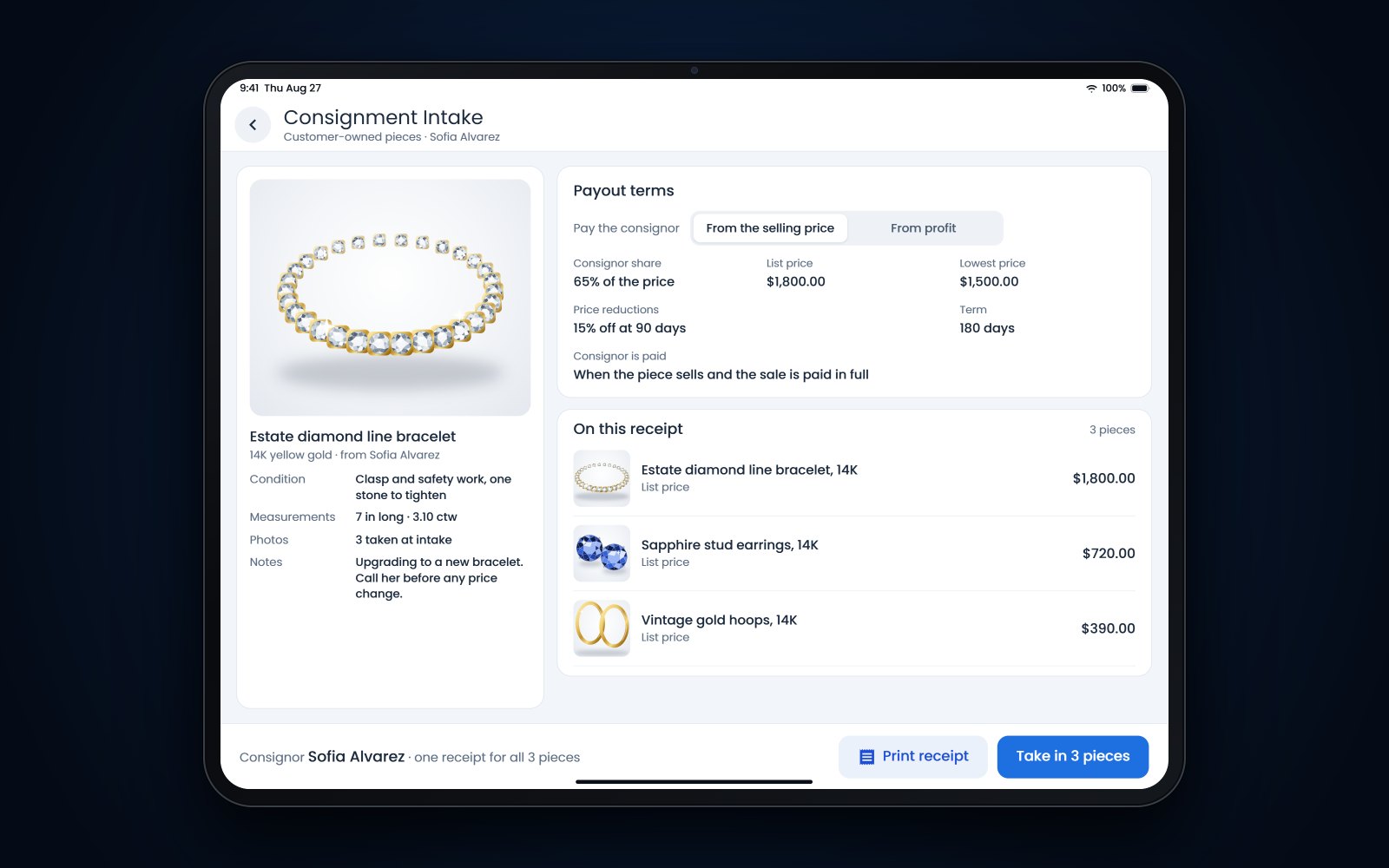
When a customer asks you to sell a piece for them, you can now take it in from the customer's record or straight from the sale screen. Enter one piece or several. Flawless creates or reuses a consignor account for that customer, puts every piece on one intake and issues one non-taxable receipt for the customer.
Set the terms while you add each piece. Pay the consignor a percentage of the selling price or a share of the profit, and schedule automatic price reductions with the timing, the percentage, the number of reductions and the lowest price you'll accept. When a piece sells, the payout stays on your list until it is settled.
Where to find it: on the customer's record, or on the sale screen. Staff need inventory receiving access.
Repair estimates customers approve and pay from one link
When you send a repair or custom estimate for approval, you can now ask for the full amount or a smaller payment with it. The customer opens a page that works well on a phone, reviews the estimate, approves it and pays by card on the same page. The approval and the payment are recorded together on the job, which saves a phone call to take the deposit.
Where to find it: on a service job, when you send the estimate for approval.
Wholesale accounts can pay invoices online
Emailed wholesale invoices now include a button to view and pay the invoice online. Your wholesale customer lands on a secure page with the invoice, its terms, the payments already made and the live balance, and can pay by card, by bank transfer (ACH), or with PayPal or Venmo if you've connected PayPal. You can also list your Zelle details, and when an account reports a Zelle transfer, you confirm it once the deposit shows up and it is applied to the invoice.
Payments post to the invoice as they go through, the account gets an emailed receipt, and whoever sent the invoice is notified. You choose which payment methods to accept and whether partial payments are allowed, with overrides for individual accounts.
Where to find it: Admin, then Accounting, then Online Invoice Payments.
Refund a return to the original card
With a return in the cart, checkout now offers Refund to Original Card. The register finds the card charge that paid for the original sale, you pick it, and the refund goes back to that same card, either the full remaining amount or a partial amount you enter. Nobody has to re-key a card or run a blind credit.
If you pick the wrong charge or amount, void it on the spot before you finish the sale. Staff with the returns permission can use it, and a manager can approve it for anyone else. If the sale was paid by cash or check, the register tells you to refund another way.
Where to find it: the checkout payment screen, whenever a return is in the cart.
Find or add a customer from a license or business card
At the register, click the scan icon in the customer search box and take or upload a photo of a driver's license or a business card. Flawless reads the details. If the customer already exists, you get a short list of likely matches, and if not, a new customer record opens with the name, contact details, address and date of birth filled in.
License photos are stored securely with the sale, never at a public web address, so you have them as chargeback evidence. Business card photos are read for their details and then discarded.
Where to find it: the scan icon in the customer search box.
Summer updates with their own posts
- Receiving from a photo. Snap or upload an invoice or memo, or text the photo to your store number, and it becomes a receive that is ready to review. See receiving jewelry inventory from the invoice.
- Integrations. One-click journal entries to QuickBooks Online and account mapping, a Zoho Books connection, bulk GIA and IGI report refresh, a choice of JM Shipping or ShipEngine for each label, Parcel Pro, hold at a carrier location, and EDI orders for wholesalers. See jewelry store integrations.
- The AI website builder. Cart and checkout, product pages with working variants, quick view, search data, accessibility checks and whole-site builds. See building a jewelry store website with AI.
- Calls from your computer. Answer and place calls inside Flawless, with each call's summary and transcript beside it. See a phone system for jewelry stores.
- The AI receptionist. It can now give repair and order status, hang up on spam calls, follow your holiday hours and transfer callers between your stores. Our guide to what an AI receptionist for jewelry stores should answer covers setting one up.
Call recording and transcription require appropriate consent.
More Flawless POS updates this summer
Inventory and photos
- AI Product Studio works in batches. Make e-commerce photos, model photos or both for many products at once, with one styling direction and batch tweaks such as setting every background to pure white, then review the results and choose what is saved.
- New products can be queued automatically for AI web titles, descriptions and missing catalog details, and, if you choose, for e-commerce and model photos when a photo is added.
Point of sale and payments
- Payment rules for layaways and special orders. Admins set a percentage for each and choose whether it is suggested or required, and checkout fills it in, with a manager override when it is required.
- Payment links accept bank transfers (ACH) and work with every card processor Flawless supports.
Reports
- A My Sales dashboard where each salesperson sees their own sales for today, the month and the year to date.
Phones
- A visual designer for how your phone answers: greetings, robocall screening, business hours, routing by what callers say and hand-off to the AI receptionist, saved as a draft until you publish.
Website
- The Meta (Facebook) pixel is built in. Save your pixel ID, and pages built with the AI website builder load it only after a shopper accepts analytics cookies.
- Edit your site's robots.txt file from the Pages screen.
Deliveries
- An optional delivery workspace. Turn recent sales into a route, assign a driver, and collect photos and a signature at each stop from the driver's phone.
Turning the new features on
These updates come with the regular Flawless web update. A few need to be switched on first: online invoice payments, the layaway and special-order payment rules, the Meta pixel and the delivery workspace. Call (970) 471-7558 or email help@flawlesspos.com and we'll set them up with you. If you're not on Flawless POS yet, book a demo.
See also: All Flawless POS features.
Frequently asked questions
How are consignors paid?
You choose for each piece when you take it in: a percentage of the selling price or a share of the profit. Payouts stay on your list until they are settled, and scheduled price reductions apply to the piece you set them on.
Can a customer pay only part of a repair estimate?
Yes. When you send the estimate for approval, you can request the full amount or a smaller payment. The customer approves and pays on the same page, and both are recorded on the job.
What if I refund to the wrong card charge?
Void the refund from the payments list before you finish the sale, then pick the right charge. Only staff with the returns permission can refund to the original card, and a manager can approve it for anyone else.
Where are scanned driver's license photos kept?
They are stored securely with the sale and are never placed at a public web address. Business card photos are read for their details and then discarded.