
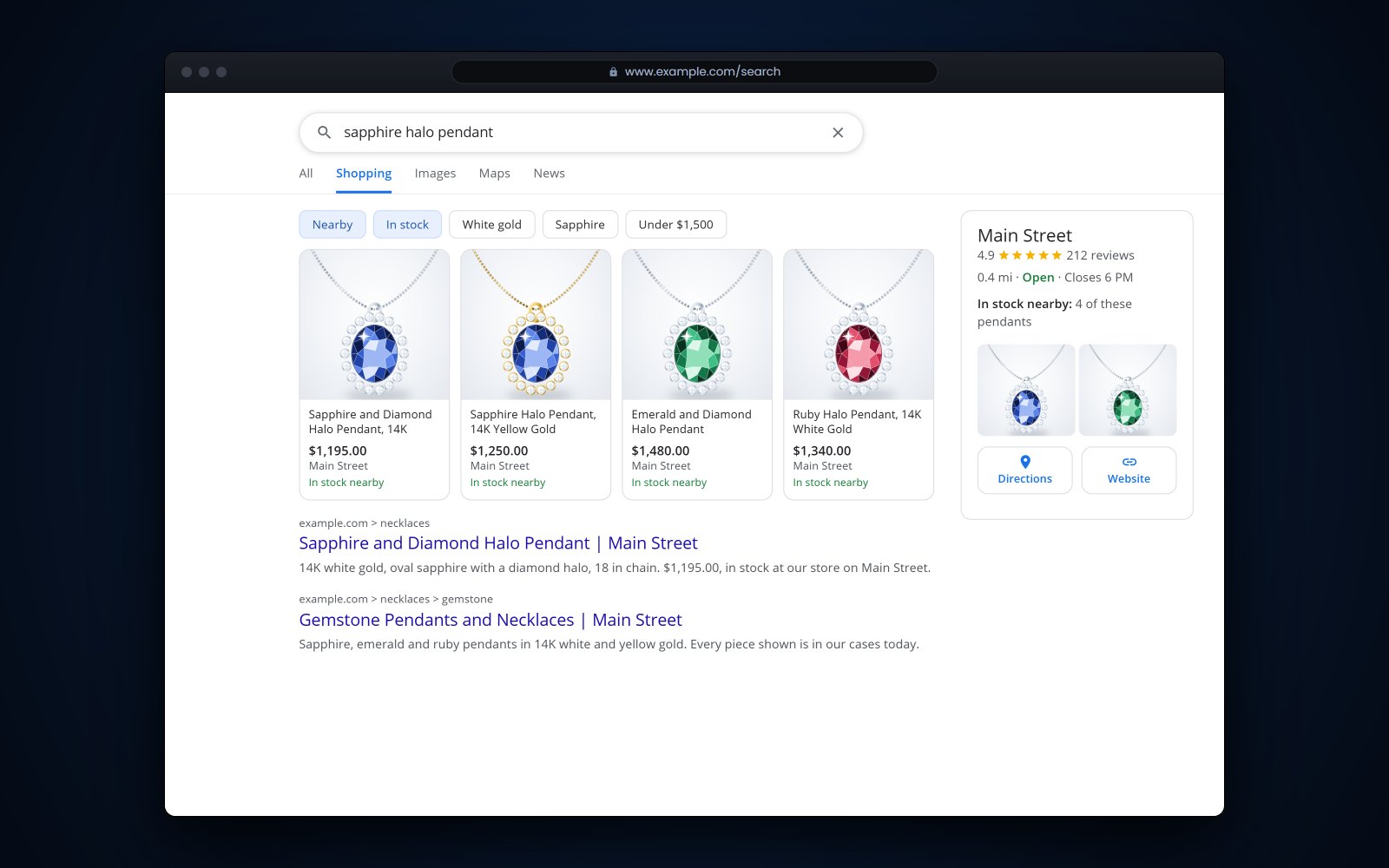
Short answer: Google Merchant Center is where a jewelry store sends its product data so pieces can appear in Google's free listings and, if you pay, in Shopping ads. Each piece needs an ID, title, description, price, availability, a link and a clear photo, plus a brand and product identifiers when it has them. A one-of-a-kind piece without a GTIN can say so instead of inventing one, and the same product data, kept in step with your POS, can also fill a Facebook and Instagram catalog.
In this article
- Free listings or Shopping ads?
- What a jewelry feed needs in Google Merchant Center
- One-of-a-kind, estate and custom pieces
- Google rules that trip up jewelry stores
- Keeping prices and stock in step with your POS
- Local inventory for pieces in your store
- Facebook and Instagram catalogs
- How Flawless POS sends your pieces to Google, Facebook and Instagram
- Frequently asked questions
Free listings or Shopping ads?
A customer searches for "oval sapphire halo ring" on her phone and sees pieces with photos and prices from several stores. Some of those are paid ads and some are free listings. Both come from Google Merchant Center, the free account where you send Google a list of your products, called a feed.
| Question | Free listings | Shopping ads |
|---|---|---|
| What it costs | Nothing to appear | You pay through Google Ads, usually per click |
| Where pieces show | Across Google, including Search results, the Shopping tab and Google Images | Ad slots, including on the Shopping tab |
| What you control | Your product data | Your product data, plus budget and bids |
| Where to start | Here, while you get the feed clean | Later, with a small test budget on one category |
According to Google's free listings help page (opens in a new tab), new Merchant Center accounts are opted in to free listings by default, but being opted in does not mean every piece will show. Only product pages qualify; your home page and category pages do not. Free listings also ask for a return policy on your website and, in the US, shipping information.
Both use the same feed, so the work below pays off either way.
What a jewelry feed needs in Google Merchant Center
Google's product data specification (opens in a new tab) lists what each product needs. For a jewelry store, these are the fields to get right:
| Field | What Google wants | Jewelry tip |
|---|---|---|
| id | A unique ID for each product | Use your SKU or stock number so it matches your POS |
| title | Up to 150 characters that match the product page | Metal, karat, stone, shape, carat weight and style |
| description | Up to 5,000 characters about the product only | Measurements, stone details, certificate and lab, and no sales talk |
| link and image_link | The product page and its main photo | The photo must show the exact piece being sold |
| price and availability | Must match the product page | Change both the moment a piece sells or is repriced |
| condition | Required for used and refurbished items | Estate and pre-owned pieces are "used" |
| brand | Required for new products | The designer's name, or your store's name for pieces you make |
| gtin and mpn | Only identifiers the manufacturer assigned | Never make one up; many fine jewelry pieces have none |
| age_group, gender, color | Needed for apparel and accessories in free listings | Usually adult; female, male or unisex; and the metal color |
| item_group_id | Groups the variants of one product | Ring sizes and metal colors of the same design |
Jewelry sits inside Google's Apparel and Accessories category, with subcategories for rings, necklaces, earrings, bracelets and watches. For free listings, Google asks products in that category for an age group, a gender and a color (age group rules (opens in a new tab)), so it is easier to send them from the start than to clear warnings later.
Tip: Write titles a shopper can read. "14KW RD 1.00 SOL" means nothing on Google, while "14K White Gold 1 Carat Round Diamond Solitaire Engagement Ring" matches what people type.
One-of-a-kind, estate and custom pieces
Product feeds were designed around goods with barcodes. Much of what a jeweler sells has none, and Google allows for that:
- Without a GTIN, leave the field blank. Google asks for a GTIN only when the manufacturer assigned one, and tells merchants not to guess or make one up. If a piece has no GTIN and no brand with a manufacturer part number, set identifier_exists to no.
- Without a brand, leave that field empty too. Don't fill it with placeholder words like "Generic" or "None". For pieces your shop designs and makes, your store's name can be the brand.
- Estate pieces are used. Google requires the condition field for second-hand items, so set it to used (condition attribute (opens in a new tab)). Saying "estate" or "pre-owned" in the title helps shoppers too.
- One piece, one listing. When a one-of-a-kind piece sells, it has to leave the feed or show out of stock right away, or shoppers will click through to something you can't sell them.
Describe lab-grown and treated stones clearly
The FTC's Jewelry Guides apply to your feed and website just as they apply at the counter. A lab-made stone described with a gem name needs a qualifier such as "laboratory-grown" or "laboratory-created" immediately before the name, shown as clearly as the name itself (16 CFR 23.25 (opens in a new tab)). In practice, write "laboratory-grown diamond" in the title, not only somewhere in the description.
The guides also say to disclose gemstone treatments that are not permanent, need special care or significantly affect value, and for online sales that disclosure belongs in the product description (16 CFR 23.24 (opens in a new tab)). This is general information, not legal advice; check the guides with your own advisor.
Google rules that trip up jewelry stores
Watch for these before they turn into disapprovals:
- Price and availability mismatches. Google crawls your product pages and compares them with your feed. Prices must match exactly, and a mismatch can get the piece disapproved and may put the account at risk of suspension (mismatched price help (opens in a new tab)).
- Photos. The main image must clearly show the exact item for sale, with no promotional text, watermarks or borders (image requirements (opens in a new tab)). On April 14, 2026, Google announced that the minimum size for product images rises to 500 x 500 pixels on January 31, 2027 (2026 specification update (opens in a new tab)).
- AI-made photos and text. Images created with generative AI must keep the metadata that marks them as AI-generated, and AI-written titles and descriptions belong in Google's structured title and structured description fields (AI-generated content (opens in a new tab)).
- Designer names. Google's counterfeit policy covers listings that pair a brand name with words like "replica", "imitation" or "knock off" to pass a piece off as the real thing. Google treats violations as egregious, which can mean suspension without warning (counterfeit products policy (opens in a new tab)). Keep other designers' names out of titles for pieces that aren't theirs.
Tip: Look at the Needs attention list in Merchant Center once a week. A disapproved piece is invisible to shoppers until you fix it.
Keeping prices and stock in step with your POS
A feed is a copy of your inventory, and copies drift. The safest setup is a feed generated from the same inventory your POS uses, so a sale, a hold or a price change reaches the feed without anyone having to remember it.
- Update the feed at least daily, and more often if your tools allow. One-of-a-kind pieces can't wait for a weekly upload.
- Make sure a held or sold piece drops out of the feed or shows out of stock.
- Reprice in one place. After a move in gold, change the price in the POS and let the website and feed follow. Our post on gold prices and margins covers how to reprice.
- Leave memo pieces off the feed unless your memo agreement allows online listings.
- Spot-check 5 pieces a week. Price and availability in Merchant Center should match the product page and the tag.
The same problem shows up on your own site, and we covered it in keeping your website in step with your cases.
Local inventory for pieces in your store
Google can also show shoppers what is in stock nearby, either at no cost through free local listings or paid through local inventory ads. That suits pieces people want to see in person before buying, like engagement rings and watches.
To take part you need a physical store, and shoppers must be able to visit, see and buy the item there (local inventory policies (opens in a new tab)). The setup has 3 parts:
- A Google Business Profile for each store, with a store code.
- Your regular product feed.
- A local inventory feed that gives, for each store and piece, the store code, the product ID, availability, quantity and price.
Store codes in the local feed must match the codes on your Business Profile, and Google may ask you to take part in inventory verifications. If your profile needs work first, start with local SEO for jewelry stores.
Facebook and Instagram catalogs
Meta works from a catalog, a list of your products that drives catalog ads on Facebook and on Instagram's feed, Stories and Explore (Instagram catalog ads (opens in a new tab)). You can usually fill it from the same product data you send Google, with a few differences in Meta's catalog field rules (opens in a new tab):
- The required fields are familiar: id, title, description, availability, condition, price, link and image_link, plus at least one of brand, GTIN or MPN.
- Titles can run to 200 characters, but Meta recommends 65 or fewer so they don't get cut off.
- Images must be JPEG or PNG, at least 500 x 500 pixels and no larger than 8 MB.
- Prices are written as a number and a currency code, like 1250.00 USD.
- If an ID appears twice, Meta ignores every copy, so IDs have to be unique.
Catalog ads also use the Meta Pixel or app events to measure what shoppers do on your site (catalog ads overview (opens in a new tab)), so plan that part with whoever manages your website.
How Flawless POS sends your pieces to Google, Facebook and Instagram
Flawless POS creates Google, Facebook and Instagram product feeds from your inventory, and your Flawless website stays synced with that same inventory. The jewelry details your team already records, such as metal, stone, carat weight and certificates, live on the same item record.
If your online store runs on Shopify or another big platform, Flawless integrates with it. Our guide to jewelry store integrations covers what to ask about any connection.
To see your own pieces in a feed, book a demo and bring a few SKUs.
See also: Jewelry website and online store.
Frequently asked questions
Do I need a GTIN for one-of-a-kind jewelry?
No. Google asks for a GTIN only when the manufacturer assigned one, and it tells merchants not to make one up. For estate, custom and store-made pieces, leave the GTIN empty and set identifier_exists to no if the piece also has no brand and manufacturer part number.
Are Google free listings really free?
Yes. Appearing in free listings costs nothing, while Shopping ads are paid through Google Ads. Being eligible doesn't mean a piece will show, since Google matches products to searches using your product data.
How often should a jewelry feed update?
At least once a day, and ideally as soon as a piece sells or changes price. Google re-checks product pages and disapproves pieces whose price doesn't match. With mostly one-of-a-kind stock, a weekly upload falls behind.
Can pieces I only sell in the store show on Google?
Yes, through free local listings or local inventory ads. You need a physical store, a Google Business Profile with store codes and a local inventory feed. Customers must be able to see and buy the piece in person.
How should lab-grown diamonds appear in a feed?
With a clear qualifier such as "laboratory-grown" or "laboratory-created" right before the word diamond, in the title as well as the description. The FTC's Jewelry Guides cover online listings just as they cover your counter. This is general information, not legal advice.
Sources
- Google Merchant Center Help - Free listings for products (opens in a new tab)
- Google Merchant Center Help - Product data specification (opens in a new tab)
- Google Merchant Center Help - Age group attribute (opens in a new tab)
- Google Merchant Center Help - Condition attribute (opens in a new tab)
- Google Merchant Center Help - Image link attribute (opens in a new tab)
- Google Merchant Center Help - Product data specification update 2026 (opens in a new tab)
- Google Merchant Center Help - AI-generated content (opens in a new tab)
- Google Merchant Center Help - How to fix a mismatched product price (opens in a new tab)
- Google Merchant Center Help - Counterfeit products policy (opens in a new tab)
- Google Merchant Center Help - Local inventory ads and free local listings policies (opens in a new tab)
- Google product taxonomy (Apparel and Accessories, Jewelry) (opens in a new tab)
- Meta for Developers - Catalog fields (opens in a new tab)
- Meta for Developers - Catalog ads on Instagram (opens in a new tab)
- Meta for Developers - Catalog ads overview (opens in a new tab)
- FTC Jewelry Guides, 16 CFR 23.25 (laboratory-created stones) (opens in a new tab)
- FTC Jewelry Guides, 16 CFR 23.24 (disclosure of gemstone treatments) (opens in a new tab)