
Short answer: Email marketing automation for jewelry stores means setting up emails that send themselves when something happens: a purchase, a birthday, an anniversary, a finished repair, a cart left on your website or a year without a visit. Start with those 6, keep each one short and tied to its occasion, cap how often any client hears from you, and hold them back from anyone with an open complaint. Under the FTC's CAN-SPAM rules, every marketing email needs an honest subject line, a clear way to unsubscribe and your store's postal address.
In this article
- Email marketing automation for jewelry stores: 6 journeys at a glance
- The thank-you and care email after a purchase
- Birthday and anniversary emails for a jewelry store
- Repair ready and pickup reminders
- Abandoned cart emails for jewelry
- Win-back emails for clients you haven't seen in a year
- Email rules: consent, unsubscribe and a real address
- How to measure email automation
- Email automations in Flawless POS
- Frequently asked questions
Email marketing automation for jewelry stores: 6 journeys at a glance
For example, a customer buys an anniversary band in October. Next October he needs a gift again, and nobody at the store remembers to remind him. An automated email would have, because the date was already on his record. Most occasions in a jewelry store come around on a schedule, and the dates are already in your system.
Each journey below is a short series of emails that starts on its own when something happens. The timings are suggestions; adjust them to your store.
| Journey | Starts when | Suggested timing | Goal |
|---|---|---|---|
| Thank-you and care | A purchase is completed | 1 to 2 days after the sale, then a cleaning invitation at about 6 months | A good first impression and fewer care problems |
| Birthday | A birthday is on the record | About 2 weeks before | A visit, or a gift to themselves |
| Anniversary | An anniversary is on the record | 3 to 4 weeks before | Time to shop or place a custom order |
| Repair ready | A job is marked ready | Right away, then at about 7 and 21 days | Pickups, and fewer pieces left behind |
| Cart left online | A known shopper leaves items in the cart | A few hours later, then the next day | A finished order or a question |
| Win-back | No purchase or visit in 12 months | At 12 months, then once more 3 to 4 weeks later | A lapsed client back in the store |
Frequency caps and who to leave out
Set a cap so no client gets a pile of automated emails in one week. For example, no more than one automated email every 3 days and 4 in a month, with repair pickup notices allowed through. Then leave out:
- Anyone who has unsubscribed.
- Clients with an open complaint or a dispute in progress.
- Clients with an open repair, special order or layaway, for the marketing journeys.
- Anyone your staff have flagged, for example after a death in the family.
- Your own staff and vendors, unless you want them included.
Keep the personal call or text from a salesperson for the moments that need it. Our daily clienteling routine covers that side.
The thank-you and care email after a purchase
Send it a day or two after the sale, from the salesperson by name if you can. Thank them, confirm what they bought and give care tips that fit the piece: how to clean it, what to avoid and when to bring it in for a check. If you offer free cleanings or prong checks, say so and invite them back in about 6 months.
Leave out the discount. A thank-you that turns into a sales pitch reads like one. Watch for gifts and surprises too. An engagement ring bought in secret is the obvious case, because a care email in a shared inbox can spoil the proposal. Give staff a way to mark a sale as a surprise and hold the email until after the date.
For the personal side of follow-up, see our post-purchase follow-up plan.
Birthday and anniversary emails for a jewelry store
These only work if the dates are on the record, so ask for them at the counter, at repair intake and on your website.
Birthday
Send it about 2 weeks before, to the person whose birthday it is. Keep it warm and short. A small offer or an invitation to come in is fine, as long as it still reads like a note from a store that knows them.
Anniversary
Send it 3 to 4 weeks before, to the person who usually does the buying, so there is time to shop or place a custom order. Mention what they bought last time only if it helps, such as "We still have her ring size on file," and never in a way that spoils a surprise.
Dates go stale, and this is where that hurts. Couples divorce, and spouses die. An anniversary email after either is painful to receive. Give staff an easy way to stop the anniversary journey on a client's record, and use it the moment they hear.
Repair ready and pickup reminders
Send this the moment a job is marked ready: what is ready, any balance due, your hours and what to bring. If the piece is still waiting, remind them at about 7 days and again at 21. If your repair terms say what happens to items left past a set time, quote that language in the last reminder.
This one is closer to a service message than to marketing. The FTC's CAN-SPAM guide treats an email whose primary purpose is a transaction the customer already agreed to as a transactional or relationship message, exempt from most of the law's rules, though its routing information must still be accurate. Put a promotion in the subject line or at the top and it can count as commercial, so keep sales offers out of pickup reminders.
If a job needs a decision first, such as an estimate the customer has to approve, a person should call. Good job status tracking is what makes this email possible; see our jewelry repair software page.
Abandoned cart emails for jewelry
A cart email only works if you know who the shopper is, because they signed in or typed their email at checkout. Send the first one a few hours later and a second the next day, then stop. Show the piece with its photo, name and price, link straight back to the cart, and offer a way to ask a question or book a time to see it in person.
Do not attach a discount by default. If every abandoned cart earns a coupon, regular shoppers will notice. For one-of-a-kind pieces, check availability before the email goes out. If the estate ring sold in the store this morning, the email should say so and suggest something similar.
Cart reminders promote a purchase that has not happened yet, so treat them as marketing emails, with the unsubscribe link and postal address included.
Win-back emails for clients you haven't seen in a year
Pick a clear trigger, such as no purchase and no visit in 12 months. Count repairs and cleanings as visits, since a client who came in for a watch battery last spring has not gone anywhere. Send one email with a reason to come in: a free cleaning and inspection, new arrivals in what they like, or a note from their salesperson. Follow up once, 3 to 4 weeks later. If neither gets a response, move them to your regular newsletter or stop.
Leave out anyone with an open repair, layaway or special order. They are active clients, and a "we miss you" email while their ring is on your bench reads badly.
Email rules: consent, unsubscribe and a real address
In the US, the main law is the CAN-SPAM Act. The FTC's compliance guide says it applies to every commercial email, one message or 10,000, and makes no exception for business-to-business email. The core rules:
- Header information such as From and Reply-To must be accurate and identify your business.
- The subject line must reflect what the email is about.
- Identify the message as an ad.
- Include a valid physical postal address: your street address, a PO box registered with the Postal Service, or a private mailbox registered with a commercial mail receiving agency.
- Tell people how to opt out, and keep the opt-out working for at least 30 days after you send.
- Honor opt-outs within 10 business days, without a fee and without asking for more than an email address.
- You are still responsible when an email company sends on your behalf.
CAN-SPAM is built around the right to opt out. Good practice goes further: email people who gave you their address and expect to hear from you, for example at the counter or through your website. Inbox providers watch complaints. Gmail asks every sender to keep its spam rate below 0.3% and to authenticate mail with SPF or DKIM, and its bulk sender rules require one-click unsubscribe for marketing messages. Yahoo asks bulk senders to honor unsubscribes within 2 days.
This is a summary, not legal advice. Texting has stricter consent rules; see our guide to texting customers.
How to measure email automation
Open rates are unreliable. Apple says its Mail Privacy Protection loads an email's remote content in the background regardless of whether the reader engages with it, so an "open" may not mean anyone read the email. Treat opens as a rough sign that delivery is working.
Look instead at what people do:
- Clicks and replies for each email.
- Appointments booked and repairs picked up after a reminder.
- Visits and purchases from people who got the email, within a set window such as 30 days.
- Unsubscribes and spam complaints for each journey. If one journey's numbers climb, rewrite it or send it less often.
To see whether a journey adds sales, hold out a small random group, say 1 client in 10, who do not get it, and compare their purchases with everyone else's over the same period. Without a holdout, you are also counting sales that would have happened anyway.
Email automations in Flawless POS
Flawless POS includes email campaigns, birthday and anniversary emails, post-purchase follow-ups, custom audiences and templates, and engagement tracking.
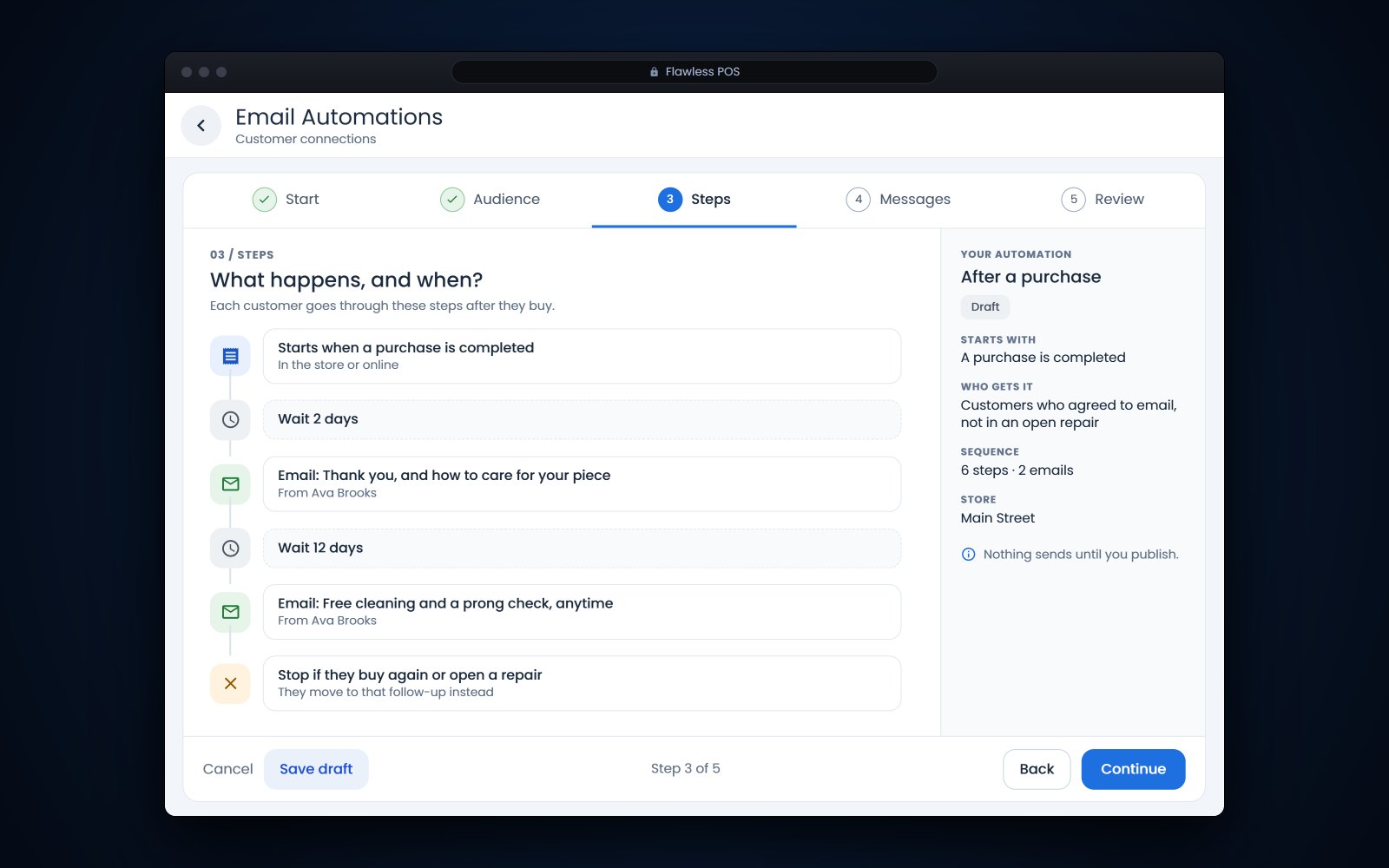
A new guided builder walks you through each email journey, for carts, purchases, repairs, birthdays and win-backs, from what starts it to a final review.
To see the guided builder with your own client list in mind, book a demo.
See also: Jewelry CRM and clienteling software.
Frequently asked questions
Do I need permission to email my customers?
The CAN-SPAM Act is built around opting out: every commercial email needs a clear way to unsubscribe, and you must honor it within 10 business days. Even so, email people who gave you their address and expect to hear from you, because inbox providers such as Gmail and Yahoo watch complaint rates. This is not legal advice.
Is a repair-ready email a marketing email?
Usually not, if it only tells the customer about their repair. The FTC treats emails about a transaction the customer already agreed to as transactional or relationship messages, exempt from most CAN-SPAM rules. Add a sale offer to the subject line or the top of the email and it can become commercial.
How many automated emails is too many?
There is no fixed number. A simple cap, such as one automated email every 3 days and 4 a month per client, keeps journeys from piling up. Watch unsubscribes and complaints for each journey and adjust.
Why do my open rates look so high?
Apple's Mail Privacy Protection loads email content in the background whether or not the reader engages with the email, which can record opens that never happened. Judge your emails by clicks, replies, visits and sales instead.