
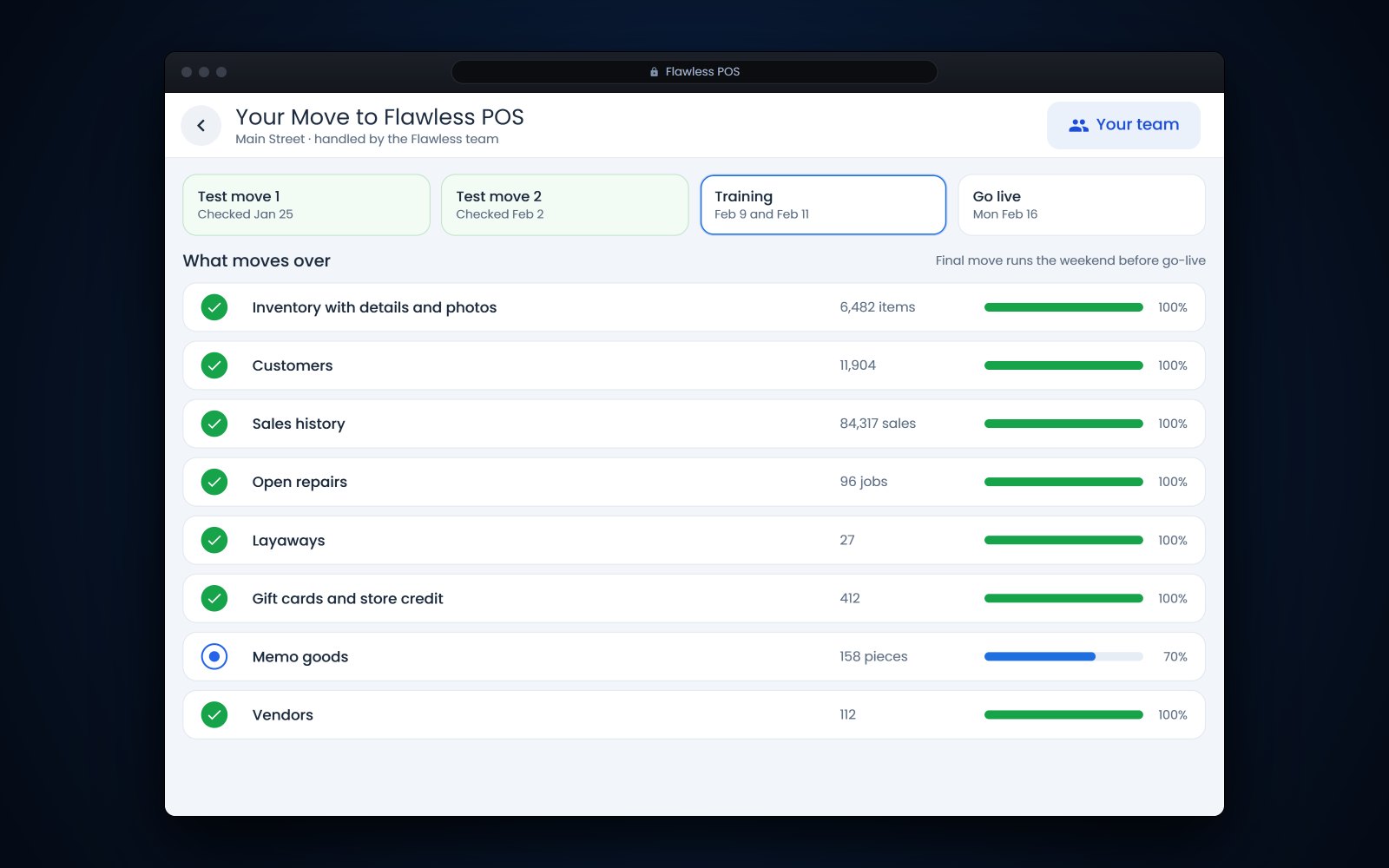
Short answer: To switch from The Edge jewelry software, start with a list of everything that has to move: inventory with details and photos, customers, sales history, open repairs, layaways, gift cards and store credit, memo goods and vendors. Run at least one test migration on your own data and check it before you pick a go-live date, then train your staff on the new system with that data. At Flawless POS, coming from another system takes a few weeks up to 2 months, depending on how complex your data is.
In this article
- Start with a list of what has to move
- Test and mock migrations before you go live
- How to switch from The Edge jewelry software in 5 stages
- How long does a switch take?
- Common migration problems and how to avoid them
- Questions to ask any new vendor
- Getting your staff and customers ready
- How Flawless POS handles a switch from The Edge
- Frequently asked questions
Start with a list of what has to move
Say you've run your store on The Edge for 10 years. You have thousands of items with stone details, a customer list built one sale at a time, and a drawer of repair envelopes with promised dates. When you switch, every one of those needs to land in the right place on day one. The Edge has been on the market since 2002, according to its website, so plenty of stores that switch have a long history to bring with them.
Use this table as your migration list. The middle column is what to bring, and the last column is how to check it.
| Data | What to bring | How to check it after a test migration |
|---|---|---|
| Inventory | Item numbers, descriptions, cost and retail, metal, weights, stone details, certificates, photos and location | Counts by category and store match, details sit in real fields, and photos are attached |
| Customers | Names, phones, emails, addresses, birthdays, anniversaries, ring sizes and notes | No new duplicates, marketing consent kept, and 20 regulars spot-checked |
| Sales history | Past sales with items, prices and salesperson | Totals by month match your old reports |
| Open repairs and jobs | Every open job with its deposit, promised date, status and photos | Each envelope in the drawer matches a job |
| Layaways and special orders | Items held, payments made, balances due and due dates | Each customer's balance matches to the cent |
| Gift cards and store credit | Card numbers and balances, and credit by customer | The total outstanding matches your old liability report |
| Memo and consignment | Vendor, memo number, items and due dates | Nothing on memo landed in owned inventory |
| Vendors | Names, contacts, terms, open purchase orders and jobs out at vendors | Open orders and vendor jobs match |
Give 2 rows extra care. Memo goods must stay apart from owned stock (see how to track memo and consignment goods), and every layaway and special order needs its deposits and balances intact. Our guide to layaways and special orders covers what each record should hold.
Not everything has to move. Customers with no purchase in a decade, items sold years ago and dead special orders can stay in your archive export, where you can still look them up. A smaller, cleaner move is faster to check.
Test and mock migrations before you go live
A test migration copies your real data into the new system so you can check it before anything goes live. A mock migration is a dress rehearsal of the final move, with the same steps in the same order, timed, so cutover weekend holds no surprises. For an Edge data migration, plan on at least one of each.
After each run, check these in order:
- Compare counts: items by category and store, customers, open repairs and layaways.
- Compare money: gift card and store credit totals, layaway balances and open deposits, to the cent.
- Spot-check 20 items you know well, including a bridal set and an estate piece.
- Spot-check 20 customers, including your best clients and someone with an open repair.
- Run last year's sales by month in both systems and compare the totals.
- Write down every difference and get an answer before the next run.
Tip: Ask your best salesperson to do the customer spot-check. They'll notice a missing anniversary or ring size faster than anyone.
How to switch from The Edge jewelry software in 5 stages
- Plan the dateChoose a go-live date away from your busiest weeks, with time to train before the next rush. Check your current contract for notice periods so you don't pay for overlap you didn't plan.
- Export, clean and keep copiesGet full exports and save copies of your key reports from your current system. Clean what you can first: merge duplicate customers, close dead special orders and fix items with no cost. Keep those exports for years. The IRS says to keep records that support your tax return for at least 3 years in most cases, and longer in some, such as 4 years for employment tax records.
- Test, fix and test againRun a test migration on your real data and check it against your list. Fix the mapping and run it again until the numbers match.
- Train on your own dataPractice the things you do every week with your real items and customers: a layaway payment, a repair pickup, a gift card sale and a memo return.
- Cutover weekendClose out the old system, run the final migration, check the money items one last time (gift cards, store credit, deposits and layaway balances) and open on the new system. Have the new vendor's team on call for the first few days.
Cutover weekend checklist
- Stop new layaways and special orders in the old system at a set time
- Export final reports: open repairs, layaways, gift cards, store credit and inventory by category
- Count the cash drawers and close the day in the old system
- Run the final migration and compare the money totals
- Check the customers who have pickups booked for Monday
- Print tags for anything received over the weekend
- Ring up a test sale, a return, a gift card and a repair pickup before you open
How long does a switch take?
It depends on how much history you have and how clean it is. A single store with tidy data moves faster than several stores with years of duplicate customers and items missing details. Most of the time goes into testing and checking, and very little into the final copy.
At Flawless, coming from another system takes a few weeks up to 2 months, depending on the complexity of your data. Starting fresh, most new users are up and running in just a few days.
| Weeks | What happens |
|---|---|
| 1 | Kickoff, exports and a data review |
| 2 to 3 | First test migration and checks |
| 3 to 5 | Fixes, a second test and staff training |
| 5 to 6 | Mock migration, then cutover weekend |
Common migration problems and how to avoid them
- Duplicate customers multiply. If the old system has 3 records for the same client, the new one will too. Merge before the move, or right after the first test while the list is short.
- Details land in the wrong place. Stone details typed into a description field won't fill proper fields by themselves. Agree with the new vendor how each old field maps, and check a handful of items by hand.
- Money doesn't match. Gift card, store credit and layaway totals that are off by even a few dollars point to a mapping problem. Find it before cutover, while there's still time to fix it.
- Photos go missing. Ask how item photos are exported and matched to items, and check the photo count after each test.
- Staff fall back on old habits. Decide in advance what the old system will still be used for, and for how long.
- The go-live date is too close to a rush. Don't go live right before a holiday, a trunk show or a big sale event.
Questions to ask any new vendor
- Which data do you bring over, field by field, and what stays behind?
- Can we run a test migration on our real data, and how many test runs are included?
- Who checks the results, and how do you report differences?
- How do open repairs, layaways, gift cards and store credit move, and how do we confirm the balances?
- What happens to item photos, customer photos and certificates?
- Who trains our staff, on what data, and how many sessions?
- Who do we call on the first Saturday, and how fast do they answer?
- Can we talk to a store that switched from The Edge?
- If card processing changes too, can saved cards move, or will customers who pay automatically need to re-enter them?
Get the answers in writing. If you're still comparing systems, our 20 questions for a jewelry POS demo cover the rest of the decision.
Getting your staff and customers ready
Pick one person as the in-store lead for the switch, and give them time to learn the new system before everyone else does. Then:
- Make a one-page cheat sheet for the 10 things your staff do every day.
- Hold a practice day on the training system with made-up sales.
- Schedule your strongest people for the first 2 days on the new system.
- Tell regular customers if receipts, texts or the website will look different.
- Keep a shared list of questions during the first week and go through it together.
How Flawless POS handles a switch from The Edge
Flawless POS is built by jewelers, for jewelers, and has been in business for more than 10 years. We bring over your inventory, customers and sales history and train your team. Test and mock migrations run on your own data before go-live, so you can check the results before you commit.
Flawless serves more than 40 jewelry businesses in more than 10 states, and before you decide you can talk to customers who switched from The Edge. For a side-by-side look, see Flawless vs The Edge and our page on alternatives to The Edge. When you're ready, book a 30-minute demo and bring your migration list.
See also: Switching to Flawless POS.
Frequently asked questions
Can I keep my sales history when I switch from The Edge?
Ask each vendor exactly which history moves and how far back it goes. At Flawless, sales history comes over along with inventory and customers. Either way, keep a full export and your old reports, because tax records need to be kept for years.
What happens to open repairs and layaways during the switch?
They should move with their deposits, balances and promised dates, and you should check every one after the test migration. It also helps to pause new layaways in the last few days before cutover so the final count stays simple.
Will our gift cards still work after the switch?
They should, as long as card numbers and balances move over. Compare the total outstanding balance before and after the final migration, and test a few real cards at the counter on day one.
When is the best time to switch?
Pick a stretch outside your busiest weeks, with time to train before the next rush. For most jewelry stores that rules out late November through December. Starting a few weeks after a busy holiday gives you a fresh inventory count and time to settle in.