
Jewelry POS on an iPad, at the counter or on the floor.
The Flawless POS app runs on iPad and iPhone, free for Flawless stores. Ring up the jewelry sales you do every day, look up pieces and customers, take signatures, and send the amount to the PAX terminal for the card.
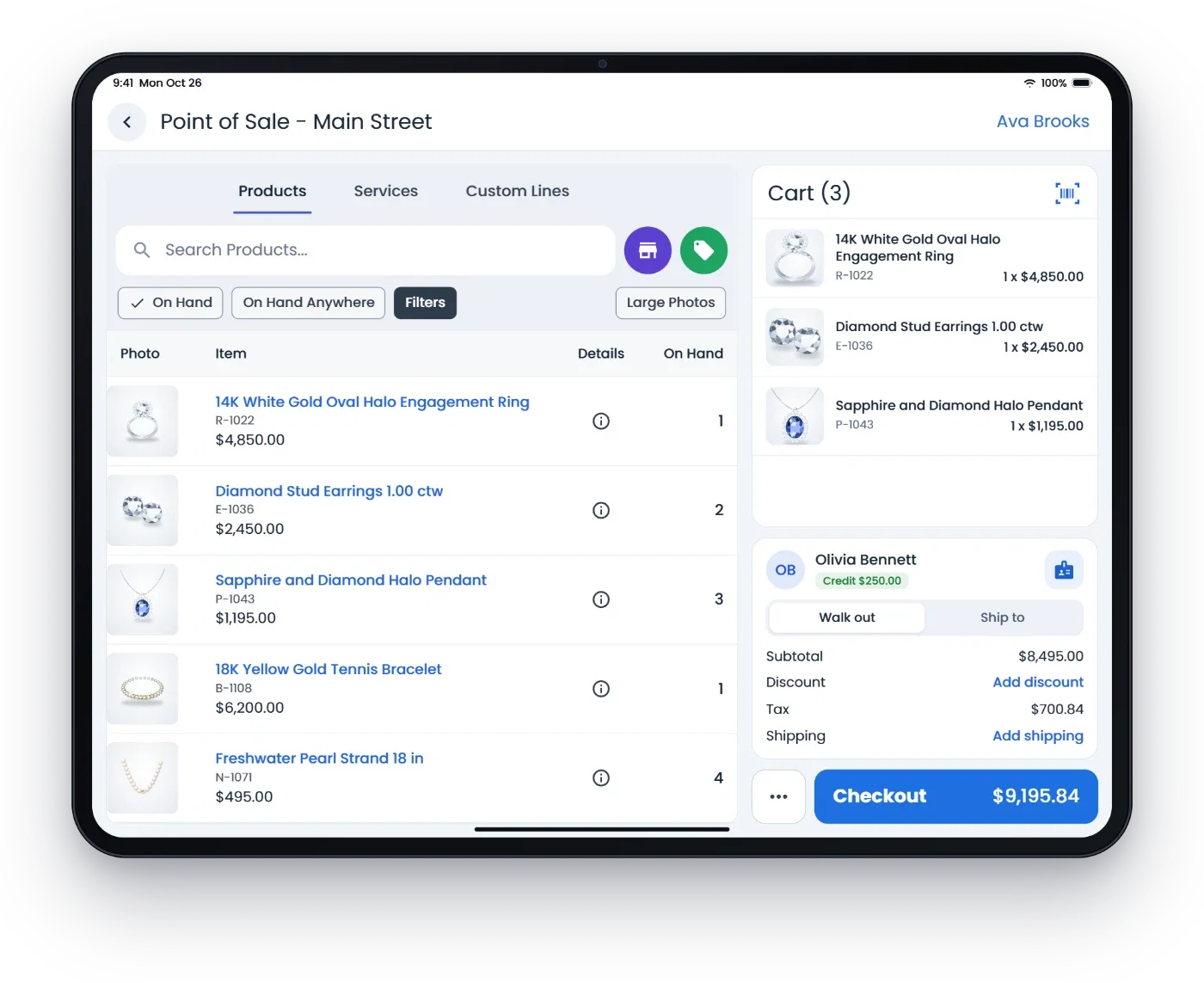
What staff do on the iPad
- Jewelry sale types
- Returns, repairs, custom builds, appraisals, trade-ins and buybacks, special orders, layaway, gift cards, consignment and Customer Memo Out, from the sale screen.
- Find the piece
- Search by SKU, title, barcode or certificate, or scan the tag with the camera. Each product shows its photo, price and stock at your store and the others.
- New customers fast
- Scan the license barcode, or photograph a license or business card and the form fills in. It checks for an existing customer first.
- One iPad, many salespeople
- Each sale starts with choosing who is selling and entering their employee code. Permissions and manager approvals follow your store's settings.
- Signatures
- Customers sign your policies on the iPad, on the payment terminal, or on their own phone by text, and the signature is saved with the sale.
- Receipts
- Send receipts by text or email, and resend them later from the sale.
Taking the payment
The iPad does not read cards. It sends the amount to a PAX payment terminal through Flawless, so nobody types it twice. See payment processing.
- The terminal reads the card
- The customer taps, inserts or swipes on the terminal, and the payment lands on the sale.
- Terminals
- PAX A920 Pro, A77, A3700 and L1400. Hand the A3700 across the counter for the customer to pay. See hardware.
- Ways to pay
- Card, cash, check, gift card, store credit, house account, rewards points, or a payment link by text or email.
- Checkout on a big screen
- The total, paid and due stay at the top, Card and Cash are big buttons, and store credit is one tap.
- ID when required
- A photo of the customer's government ID and a name match with the cardholder, when your store requires it.
- Drafts
- Save a sale as a draft and finish it later. Drafts are kept in Flawless, not on the iPad.
Customers, repairs and the rest of the day
- Customer records
- Contact details, what needs attention, purchases, jobs, wish list and notes, with one tap to start a sale.
- Texts from the store
- Text or email a customer from their record. It goes out from the store and is saved in the conversation.
- Service jobs
- Find jobs, change their status, ask for estimate approval by text or email, add photos, and send a ready job back to the sale for pickup.
- Layaway and special orders
- Hold a piece for pickup later, or order one you do not have, with deposits and pickups at any of your stores.
- Receiving
- Photograph a vendor invoice and the app reads it, for staff allowed to receive.
- My Dashboard
- Your sales, goals and the time clock, with sales performance by store and salesperson.
iPad, iPhone and Android
RFID counts run on Android handheld readers, not on an iPad or iPhone. The app needs Wi-Fi or a data connection.
- iPad
- Held sideways, products and the cart sit side by side. Held upright, the cart is one tap away.
- iPhone
- The same app on iPhone, on iOS 15 or later, free for Flawless stores.
- In Safari
- Flawless also runs in Safari on an iPad, with two product columns in landscape.
- Android
- The same app on Android 7.0 or newer, which also runs RFID handheld readers and built-in scanners. See RFID inventory.
- The Clientele app
- Texts, the team inbox and calls on your store number, on iPhone and iPad. See clienteling.
- The same sale as the web
- A sale rung up on the iPad is an ordinary Flawless sale on the customer record, and it opens on the web the same way.
Common questions
Can I run my jewelry store's POS on an iPad?
Yes. The Flawless POS app is free on the App Store for iPad and iPhone (iPadOS or iOS 15 or later) for Flawless stores, and Flawless also runs in Safari on an iPad. Staff ring up sales and returns, look up products and customers, collect signatures and send receipts. The apps come with Flawless at $500 a month per store, with unlimited users, month to month, and the first month is free.
Does it work on iPhone and Android tablets too?
Yes. The same app runs on iPhone, and on Android 7.0 or newer from Google Play. On an iPhone or an iPad held upright the cart is one tap away; on an iPad held sideways, products and the cart sit side by side. RFID counts and built-in scanners need Android devices.
How does an iPad take card payments?
The iPad sends the amount to a PAX payment terminal through Flawless, so nobody types it twice. The customer taps, inserts or swipes the card on the terminal, for example the PAX A3700 you hand across the counter, and the payment lands on the sale. The iPad itself does not read cards.
Can several salespeople share one iPad?
Yes. Every sale starts with choosing who is selling and entering that person's employee code, and permissions and manager approvals follow your store's settings. Flawless includes unlimited users.
Can I do layaway, special orders and repairs on the iPad?
Yes. The sale screen has Layaway Purchase and Layaway Payment, special orders with deposits and pickups, repairs, custom builds and appraisals, trade-ins and buybacks, gift cards, consignment and Customer Memo Out. The Service Jobs area finds jobs, changes their status, texts or emails the customer, and sends a ready job back to the sale for pickup.
Can customers sign on the iPad?
Yes. Your return policy or special order terms can be signed on the iPad screen, on the payment terminal, or on the customer's own phone by text, and the signature is saved with the sale.
Can I count inventory with RFID on an iPad?
Not on an iPad or iPhone. RFID counts run on Android handheld readers that sync with Flawless. On an iPad, staff scan barcodes with the camera and look up stock at this store and your other stores.
Can I text and call customers from an iPad?
Yes, once texting and calling are set up for your store. In the POS app, a customer's record has a box for texts and emails sent from the store. The Clientele app for iPhone and iPad adds the team inbox and calls on your store number. Unlimited texts and unlimited minutes are $250 a month each per store.
Does the iPad app work without internet?
No. Sales, customer lookups and card payments go through Flawless, so the iPad and the payment terminal need Wi-Fi or a data connection. Test the connection where you sell, especially at events.
Related
Card processing
PAX terminals that are part of your checkout.
Hardware
Card terminals, receipt printers, RFID readers and tag printers.
Clienteling
The customer record and outreach.
Pricing
$500 a month per store, unlimited users, first month free.
Guides
Mobile POS setup
Events, connection and lost devices.
Payment links
Deposits and balances paid by text.
Layaway and special orders
Deposits, holds and pickups.
Call recording and transcription require appropriate consent.
Product names are trademarks of their respective owners. Flawless POS is not affiliated with them.
See the iPad app in a demo
A 30-minute walkthrough with our team. Bring your iPad and your questions about payments, repairs and layaway.
Questions first? Email help@flawlesspos.com or send us a message.