
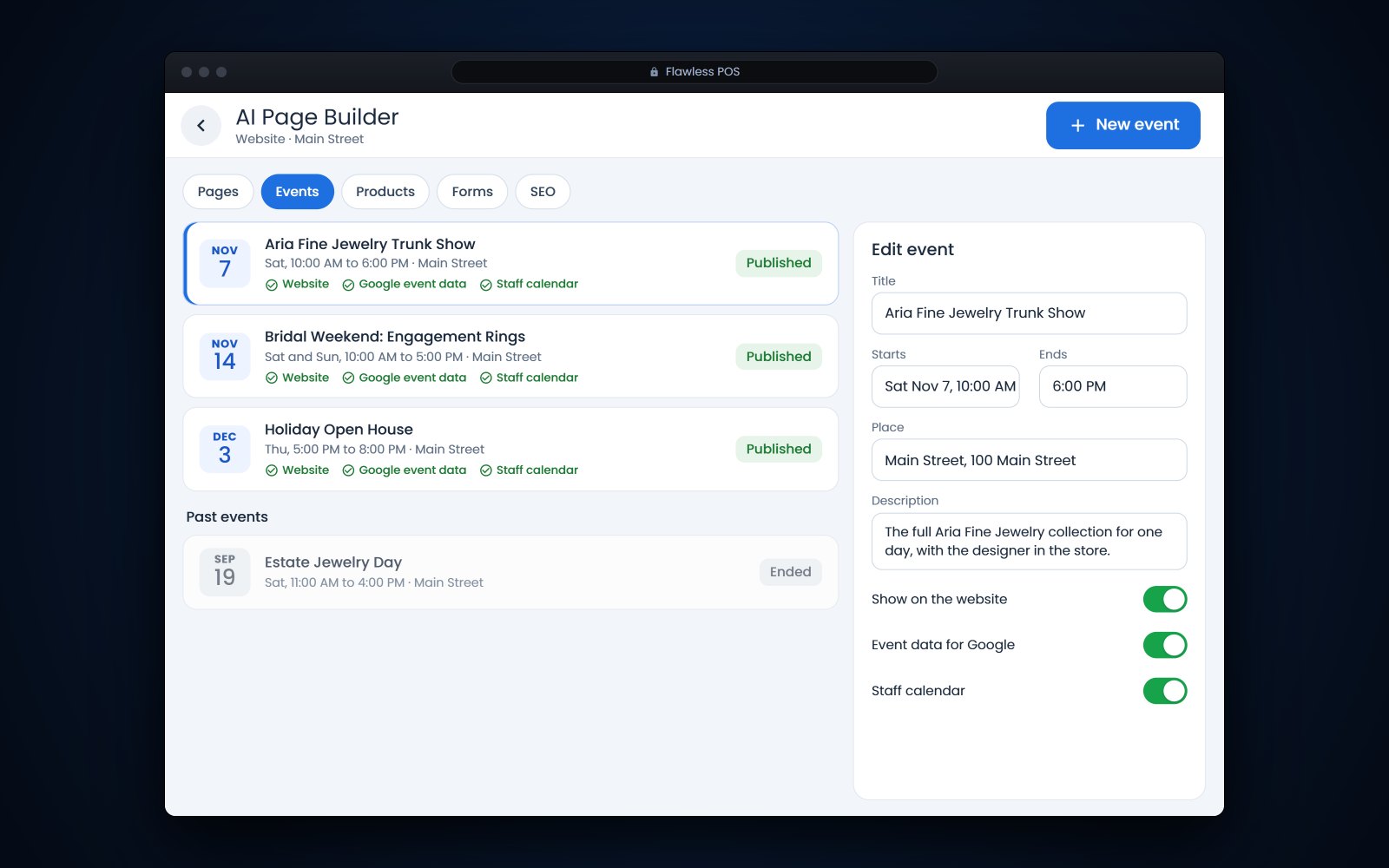
Short answer: A successful jewelry trunk show needs a confirmed designer and inventory, invitations to the clients most likely to buy, an easy way to RSVP and a follow-up afterward. To help it appear on Google, give each public event its own page with Event structured data, where the name, the start date and the location with its address are required. In Flawless POS, you enter an event's dates and place once in the website builder's Events tab, and the website, the event data Google reads and the staff calendar all use the same details.
In this article
Planning a jewelry trunk show
For example, a designer you carry offers to bring her full line for 2 days. Your clients get to see far more of the collection than you could ever stock, and you take special orders without buying the inventory first. It only works if the details are settled early and the right people come.
- Confirm the dates, the pieces coming, and who insures them in transit and while they are in your store
- Get the memo terms in writing: what arrives, what goes back and by when
- Agree on pricing, any show-only pieces and how special orders taken at the show are handled
- Ask whether the designer or a representative will attend, and at what times
- Plan staffing, case space and appointments for your best clients
- Choose how people RSVP: a call, a text or a form on your website
Trunk show pieces usually arrive on memo, so track them the same way as any other goods you do not own. Our guide to memo vs consignment covers how to keep them separate from your own stock.
Invitations, RSVPs and follow-up
| When | What to do |
|---|---|
| 4 to 6 weeks out | Send a save-the-date to clients who bought the designer before or have the line on a wish list |
| 3 weeks out | Post the event on your website and your Google Business Profile |
| 2 weeks out | Personal invitations from each salesperson to their top clients, with a way to RSVP |
| 2 days out | A reminder to everyone who said yes, with the hours and parking |
| The day after | A thank-you to guests, and a note to invitees who missed it about pieces still in the store |
| When the memo goes back | Close out special orders and write down what sold, for next year's planning |
Invitations are a natural fit for the VIP step of a daily clienteling routine. The usual rules still apply: promotional texts need written consent and marketing email needs an opt-out, as our post on texting rules and 10DLC explains.
Why dated events need structured data
A banner that says "Trunk show Saturday the 14th, 10 to 5" is easy for a person to read, but it does not tell Google the year, the time zone or the address. Structured data spells those out in a format Google reads. According to Google's event structured data documentation (opens in a new tab), markup can make an event eligible for the event experience on Google, in Search and in other products such as Google Maps.
Google requires 3 properties for an event: the name, the start date and the location, including the place's address. It also recommends an end date, a description, an image, the event status and the organizer, among others.
- One event per page. Google's event feature supports pages that focus on a single event, each at its own URL, so a page listing all your events is not the one it uses.
- Public events only. Google says events must be bookable to the general public. An invitation-only VIP preview does not qualify, so mark up the public days and keep the private evening as a personal invitation.
- Accurate details. The name, time and place must be right, and a multi-day event needs both a start and an end date.
- Dates with a time zone. Use ISO 8601 dates with the UTC offset for timed events. If you do not know the start time, give the date only instead of guessing.
- Events, not sales. Google says not to mark up time-limited sales, opening hours or coupons as events.
Markup makes an event eligible, but Google does not guarantee it will appear. Test each event page with Google's Rich Results Test, and check the report in Search Console after Google has crawled it.
Other ways to get store events on Google
Your Google Business Profile has its own event posts. Google's help page on posts (opens in a new tab) says to give an event post a title and start and end dates and times, and that an event without times shows as lasting 24 hours on its dates. A post there sits on your Business Profile, where people looking up your store already are.
Keep the details identical everywhere: the event page, the Business Profile post, the invitation and the sign in the window. When a date changes, change it everywhere on the same day.
What to put on every event page
- A clear name, such as the designer's name followed by "Trunk Show"
- Start and end dates, with times
- The place: your store name and street address
- A short description of what will be shown and the price range
- A good photo of a piece from the collection
- How to RSVP or book an appointment
- Whether special orders will be taken, and when the designer will be there
- Parking or entry notes for your location
Website Events in Flawless POS
Since October 7, the website builder in Flawless POS has an Events tab. You enter an event's dates and place once, and the same details show up in 3 places: the events lists on your website, the Event structured data on your site that Google reads, and the staff calendar in Flawless.
When a designer moves the show from Saturday to Sunday, you change it once, and the website, the structured data and the calendar all show the new date. Google sees the change the next time it crawls the page.
Your team sees the show on the calendar they already work from, so it is on everyone's schedule before the first invitation goes out. The Events tab is part of the same Flawless website that is synced with your inventory. To see it, book a demo.
See also: Jewelry website and online store.
Frequently asked questions
Can a private VIP preview show up on Google as an event?
Not under Google's event guidelines, which say events must be bookable to the general public and leave out invitation-only events. Mark up the public days and send the private preview as a personal invitation.
How far ahead should I list a trunk show?
Post it on your website and your Google Business Profile at least 3 weeks ahead, once the dates and the designer are confirmed. That leaves time for Google to crawl the page and for clients to plan around it.
Does event structured data guarantee my trunk show appears on Google?
No. Google's documentation says markup makes an event eligible but does not guarantee it will be shown. Accurate details, one page per event and a clean Rich Results Test give it the best chance.
What should I do if the date changes?
Update it everywhere on the same day. Google's event properties include a status for postponed, rescheduled and canceled events, plus a previous start date for rescheduled ones, so the old date is not left showing as current.