
Short answer: The fall 2026 Flawless POS updates, from September to October 22, add 5 new features. You can see which known clients are browsing your website, lend pieces to a client on memo, compare your stores side by side, share a client's collection as a PDF or private link, and have an appraiser sign an appraisal on a phone. Website events, email automations, payment requests and the iPhone and iPad app each have a post of their own.
In this article
- See which clients are browsing your website
- Lend pieces to a client on memo
- Compare your stores side by side
- Share a client's collection with the Jewelry Box
- Appraisals signed on the appraiser's phone
- Fall updates with their own posts
- More Flawless POS updates this fall
- Getting the new features in your store
- Frequently asked questions
See which clients are browsing your website
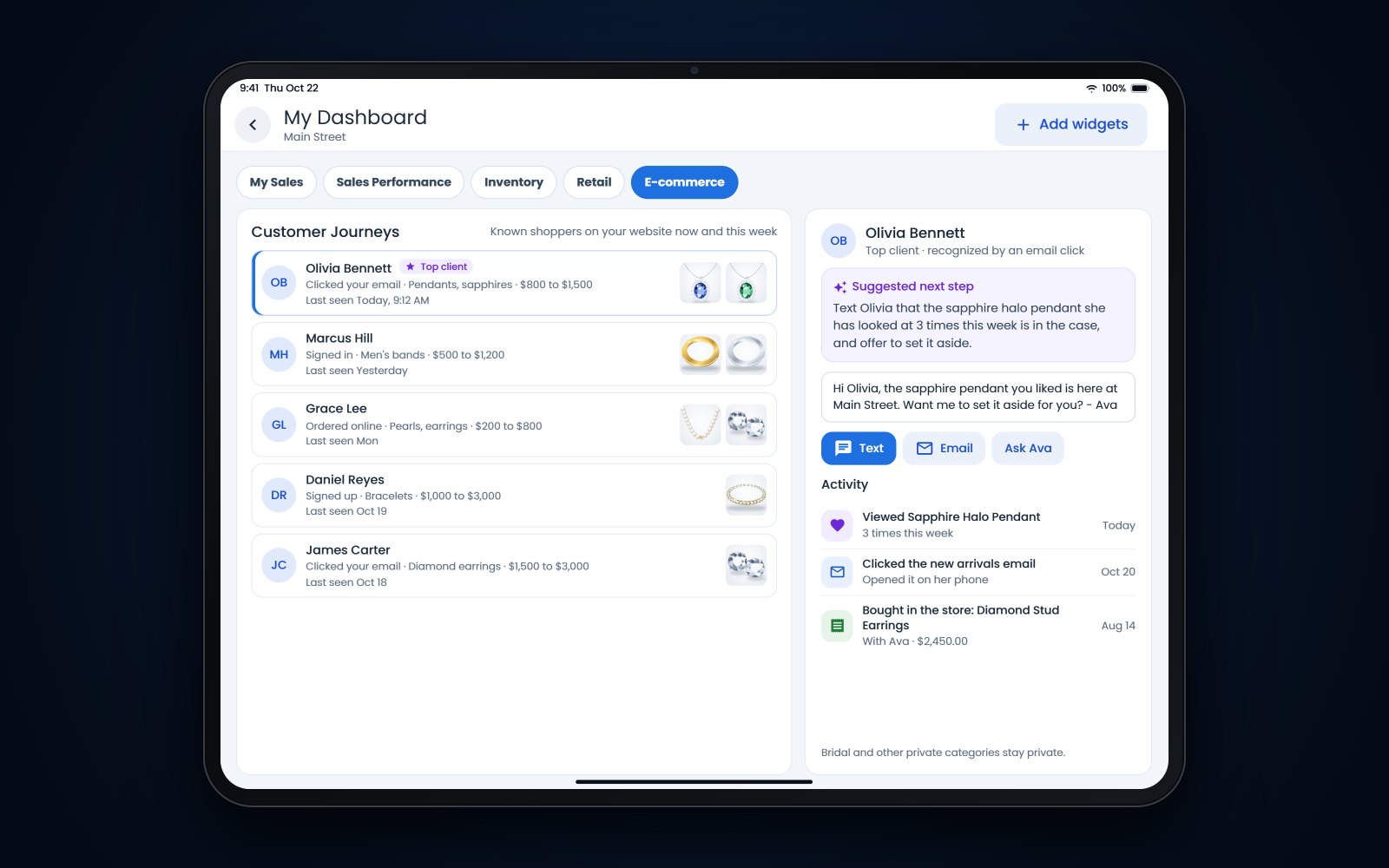
A new Customer Journeys widget for your E-commerce dashboard shows the shoppers your store already knows who are looking at your website, next to what they buy in the store. For each person you see how they were recognized (they signed in, ordered, signed up or clicked one of your emails), the pieces and categories they keep coming back to, the price range they look at, and whether they are a top client.
Open a shopper to see their activity in order: in-store purchases, pieces viewed, email clicks, and upcoming emails and appointments, with a suggested next step and wording you can edit. From there you can text or email them, ask their salesperson to reach out, pause automated emails for 2 weeks, add a note or keep the shopper private. Staff see the interests a shopper shows. There is no page-by-page browsing log, and bridal and other private categories stay private by default.
A second widget, Campaign Flow, follows one email campaign from send to sale: how many people it reached, how many clicked, looked at pieces and added to cart, and how many bought online or in the store. A store purchase counts when someone who clicked buys within 14 days, and clicks made by email security scanners are left out.
Where to find it: Dashboard, then E-commerce, then Add Widgets.
Lend pieces to a client on memo
Customer Memo Out lets a client take in-stock pieces home on approval while the pieces stay reserved on the client's order. Start from the new Customer Memo Out tile. Memo items are labeled in the cart and set to due on receipt, so no payment is asked for them. Set an expected return date, then purchase or return each piece later through Pickup or Cancel Open Orders.
A Memos tab on the customer page lists what each client has out, with its value, the return date and how many days it is overdue. The Customer Memos report shows every piece out on memo across the store. Memo out is different from customer consignment, where you sell a piece the customer owns, which we covered in selling customer-owned jewelry on consignment.
Where to find it: the Customer Memo Out tile on the sale screen.
Compare your stores side by side
The new Sales Performance dashboard puts your stores side by side and shows each salesperson's share of team sales. You can follow monthly goals, repair activity, busy hours and sales trends, and add the remaining value of open sales with Include Incomplete if you want it. The dashboard remembers your layout, and what each person can see follows their store permissions.
Where to find it: Dashboards, then Sales Performance.
Share a client's collection with the Jewelry Box
The Jewelry Box shows the pieces a client has bought and kept, by timeframe, as a grid, a table or a timeline. Choose which details show, add photos, and send it as a PDF or as a private link by email or text that opens without a login. You can include a linked partner's or spouse's purchases and show who bought each piece.
Send it before an anniversary, with an insurance update, or when a client asks what they already own from a designer.
Where to find it: on the customer profile and the activity timeline.
Appraisals signed on the appraiser's phone
You can now send an appraiser a private link by text or email to sign an appraisal. The link works without a login and expires after 1 hour. Before sending, place the signature box on the PDF. The appraiser reviews and signs on their phone, the signed PDF becomes the appraisal document, and the appraisal list shows whether each one is signed. Links can be resent or cancelled.
Where to find it: in Appraisals, when you request the appraiser's signature.
Fall updates with their own posts
- Website events. Enter an event's dates and place once, and your website, Google's event listings and the staff calendar all show it. See putting your trunk shows on Google.
- Guided email automations. A step-by-step builder for email journeys such as abandoned carts, purchases, repairs, birthdays and win-backs. See email automations for jewelry stores.
- Payment requests by text or email. The standalone payment terminal can send a payment link, and the customer can pay now or later. See payment links for jewelry stores.
- The POS app on iPhone and iPad. Since late August the Flawless POS app runs on Apple devices as well as Android. See mobile POS for jewelry stores.
More Flawless POS updates this fall
Inventory
- Inventory Checks is out of beta, with a new Easy view that shows what needs counting, what needs a review and which counts repeat. Set up a count in 3 steps: what to count (the whole store, high-ticket pieces above a price you choose, or chosen vendors, categories or designers), how often (once, or every day, week, 2 weeks, month, 2 months or 3 months), then check and save. Before you save, it shows about how many items will be counted and how many still need an RFID tag, and you can pick the day a schedule starts.
Website and product feeds
- A 3-step checkout on phones for the AI-built storefronts: contact and address, then shipping, then payment. The total stays at the top, each step ends with one button, and Place order comes last, after the card details.
- Pieces on sale now send their sale price to Google and to your Facebook catalog, with the regular price shown as the "was" price.
- A product catalog feed for Klaviyo, with current prices, stock, images, categories and options.
Marketing
- Browse follow-up emails now also reach known shoppers who arrived from one of your emails. Choose a wait of 1, 4, 12 or 24 hours. The email features the piece they looked at most, and if they come back to look again, their salesperson gets a follow-up instead of the shopper getting more emails.
Phones
- Moving an existing number to the Flawless phone system is easier. You can fill in your carrier details and sign the authorization through a link, with one authorization for each number.
Getting the new features in your store
The features in this post come with the Flawless web update, apart from the iPhone and iPad app. Some need a quick step first: add the Customer Journeys and Campaign Flow widgets to your E-commerce dashboard with Add Widgets, and turn on Inventory Checks under Admin if your store hasn't yet. Call (970) 471-7558 or email help@flawlesspos.com if you'd like a hand. If you're not on Flawless POS yet, book a demo.
See also: All Flawless POS features.
Frequently asked questions
Is Customer Memo Out the same as consignment?
No. Memo out lends your own in-stock piece to a client on approval, and the client buys it or brings it back. With consignment it works the other way around: the client owns the piece and you sell it for them.
Does the appraiser need a Flawless login to sign?
No. The signing link works without a login and expires after 1 hour. You can resend or cancel it, and the signed PDF becomes the current appraisal document.
Who on my team can see which clients are browsing?
Access is controlled by security permissions, one to view the widget and one to change its settings. That way you decide who on your team sees this activity.
Is Inventory Checks still in beta?
No. The beta label came off in October. An admin turns it on under Admin, then Account, and you can schedule counts in the Easy view or use Advanced for assignments, blind counts and approval limits.