
Flawless POS features for jewelry retail and wholesale
Everything Flawless does, grouped the way a jewelry business runs: the sale, the stock, the photos, the bench, the customer, the website, your AI and the wholesale office. Each part links to its full page.
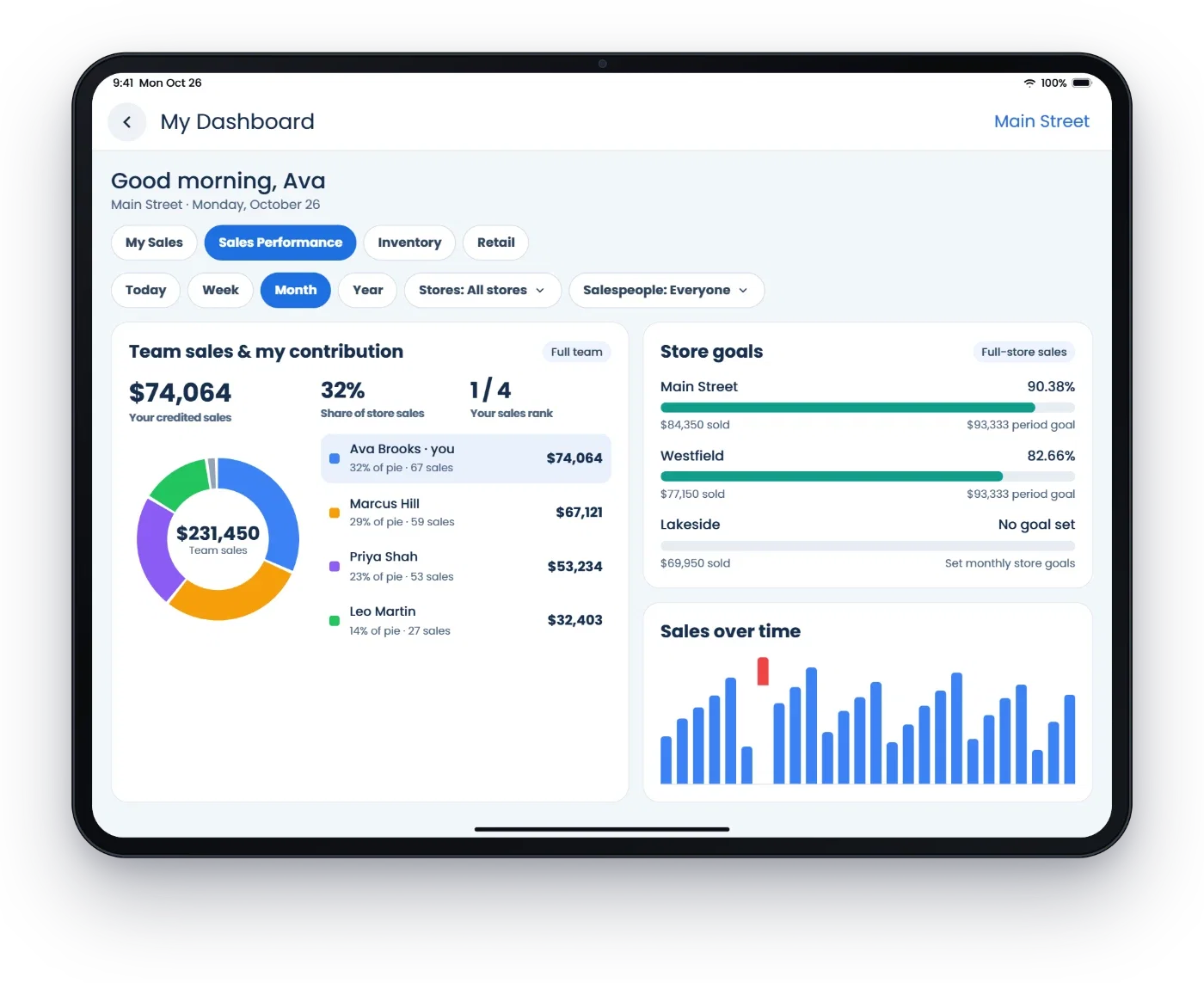
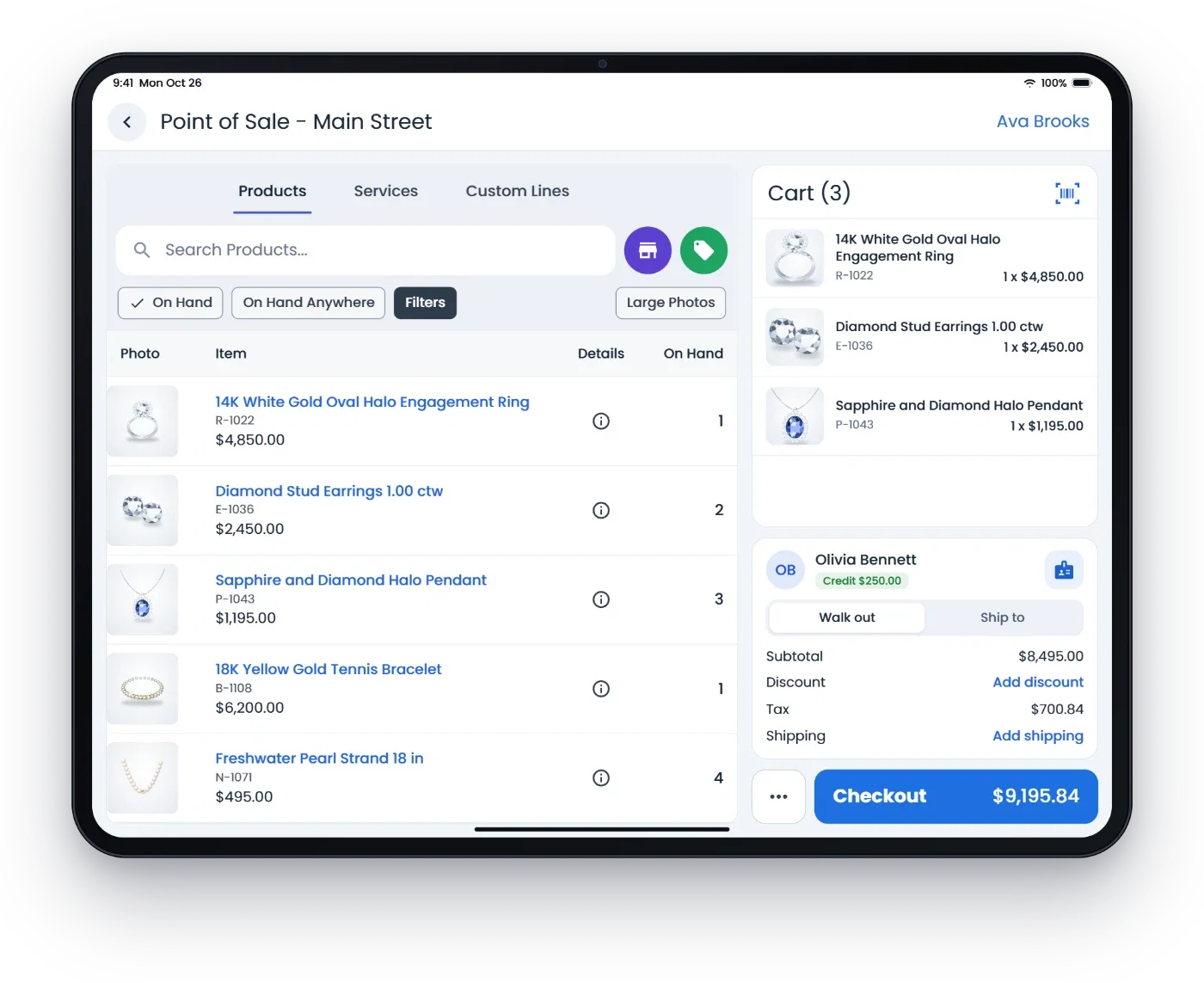
Point of sale
The sale screen your staff uses all day, at the counter, at the showcase or on the floor, on an iPad, iPhone, Android or a handheld.
- Sales, returns and voids
- Ring up a sale from inventory, scan or search, and handle returns and voids on the same screen.
- New customers from a photo
- Take a photo of a driver's license or business card and the details fill in. It checks for an existing customer first.
- Special orders and layaway
- Take a deposit, track what is owed and collect the balance when the piece is picked up.
- Gift cards and store credit
- Sell and redeem gift cards, and keep store credit on the customer's account.
- House accounts
- Charge to a house account and set up auto-pay.
- Trade-ins and buybacks
- Take in a customer's piece as a trade-in on a sale, or buy it outright.
- Repairs on the sale
- Open a repair job right on the sale, with photos, a due date and the customer's signature.
- Signed policies and receipts
- Customers sign your return policy and special order terms on screen; receipts go out by text or email.
- Rewards
- Customers earn and use rewards points at checkout.
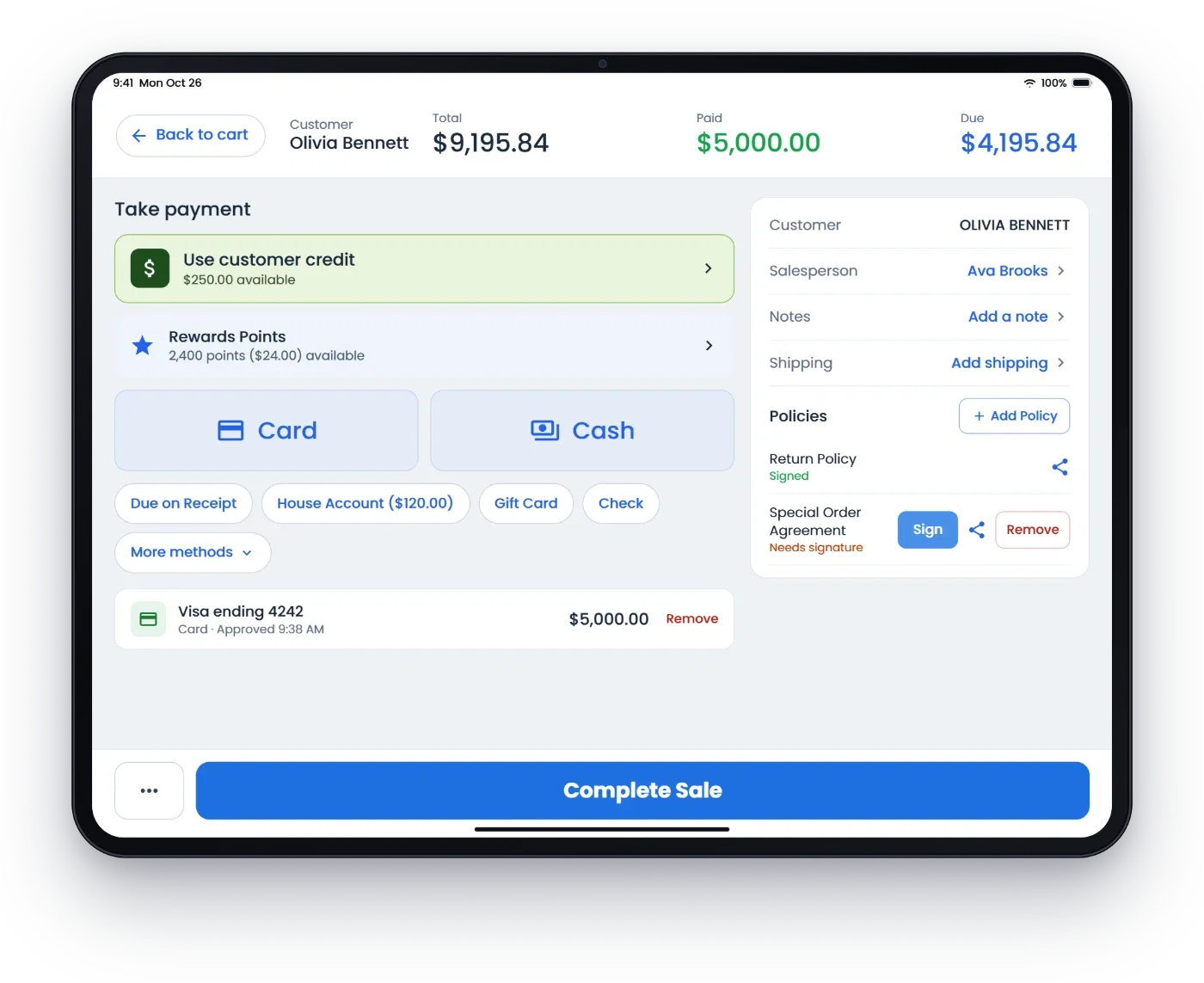
Payments
The payment is part of the sale. The amount goes straight to the card reader, on the same record, with nothing to retype.
- Card processing
- Payments run through Flawless on PAX terminals. We match or beat your current processing rates. See payment processing.
- Every way to pay
- Cards, deposits, payment links by text or email, gift cards, house accounts and auto-pay.
- Statements, deposits and disputes
- With Flawless Payments, your monthly statements, the last 90 days of bank deposits and any disputes sit right next to your sales.
- Payment video
- With Record Payment Video on, the reader's front camera films the customer as they sign your policy or the payment, and the clip stays with the sale. Android readers like PAX, 45 seconds, no sound, off until you turn it on. Recording customers may require notice or consent.
Inventory
Jewelry inventory with the details that matter, from receiving to the count.
- Jewelry details
- Shape, clarity, certification and carat on every item, plus product variations and bridal mountings and stones. See inventory.
- GIA reports
- GIA reports sync to the item, so certified stones carry their report details.
- Receive from a photo
- Take a photo of the vendor's invoice or memo and the lines fill in.
- Product tags
- Create the receive, then print RFID or standard tags in the colors you choose.
- Assembly and disassembly
- Build pieces from components or take them apart, with stock kept right.
- Audit history
- Every move of every piece, with who did it and when.
- Multi-store
- Stock by store, with transfers between stores.
- RFID counts and tags
- Count a case or the whole store with a handheld reader; RFID checkout and tag printing. See RFID inventory.
- Memo and consignment
- Vendor memo, customer memo out and consignment payouts. On memo, the vendor keeps ownership until the piece sells. See memo and consignment.
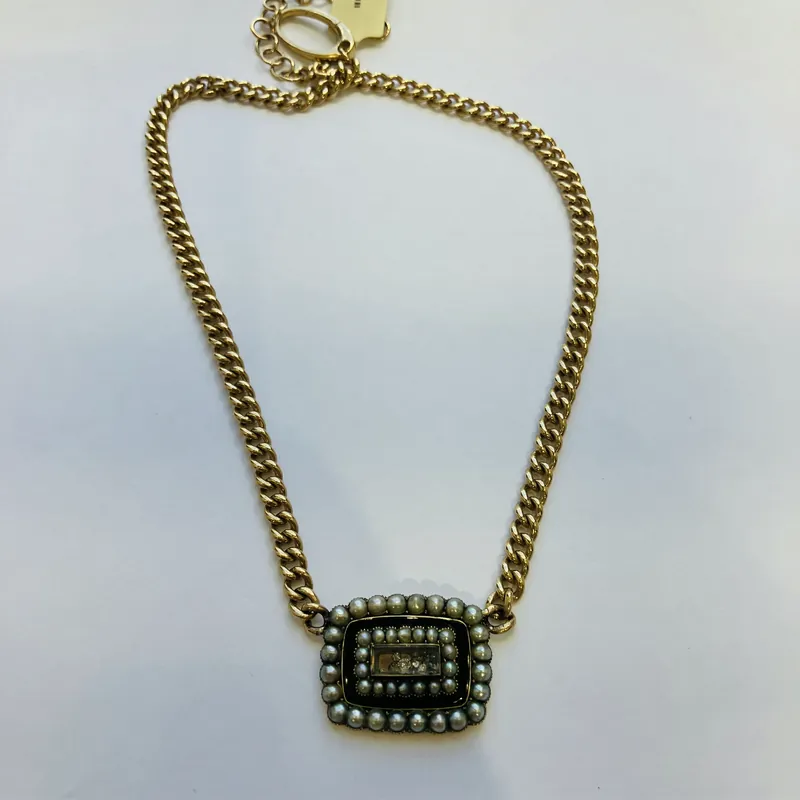
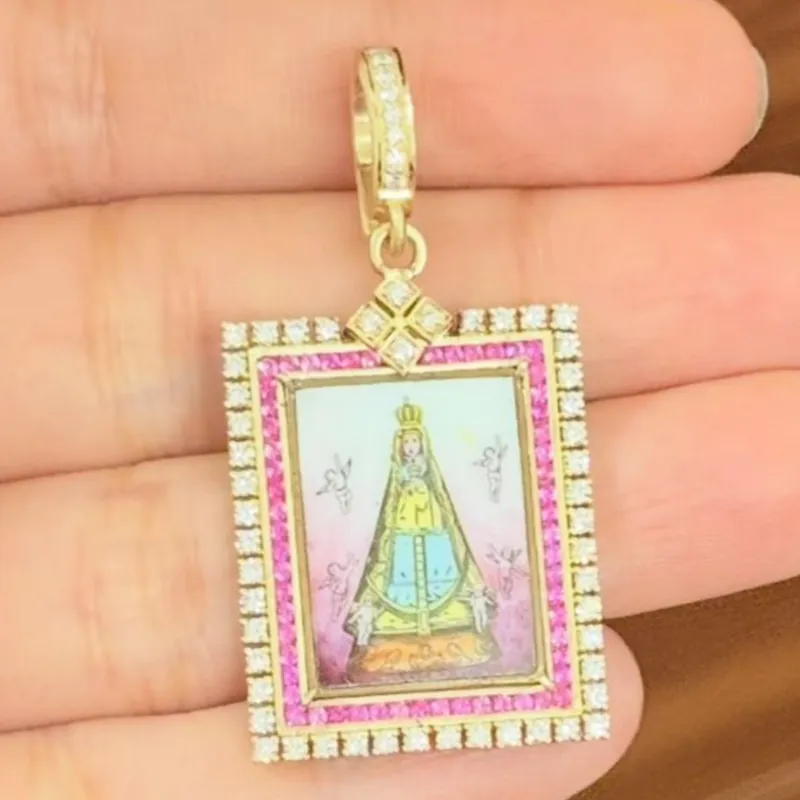
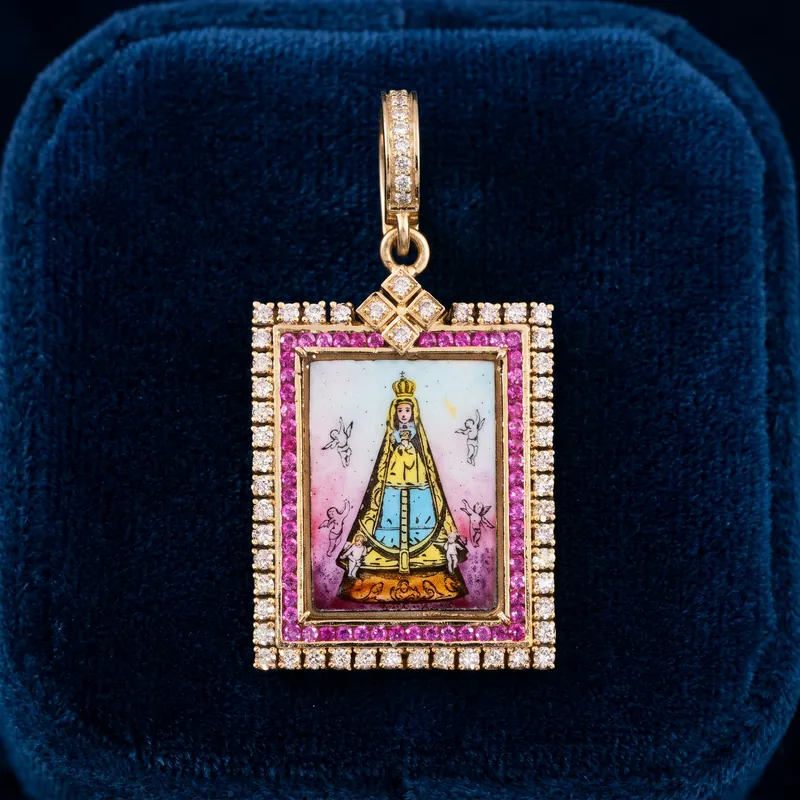
Real pieces from Cynthia Ann Jewels, which we own: a photo on a table became a 10-second video, and a photo in the hand became a photo on velvet.
- 75¢per product photo
- $1per model photo
- $10per video
AI photos and video
Snap the new piece at the counter. AI makes the clean catalog photo, the velvet shot or the gift box from it, and it goes on the item and your website.
- Product photos
- Clean on white, on velvet or marble, or in a gift box, made from the photo you took in the store.
- Model photos and video
- Pick the scene and the model, or turn the photo into a 10-second video.
- Pay for the ones you use
- 75¢ a product photo, $1 a model photo and $10 a video. Make as many versions as you like.
- Next to a photo studio
- Jewelry photo studios often charge $10 or more for each photo. 100 product photos are $75 in Flawless, not $1,000. See AI jewelry photography.
Repairs, custom work and appraisals
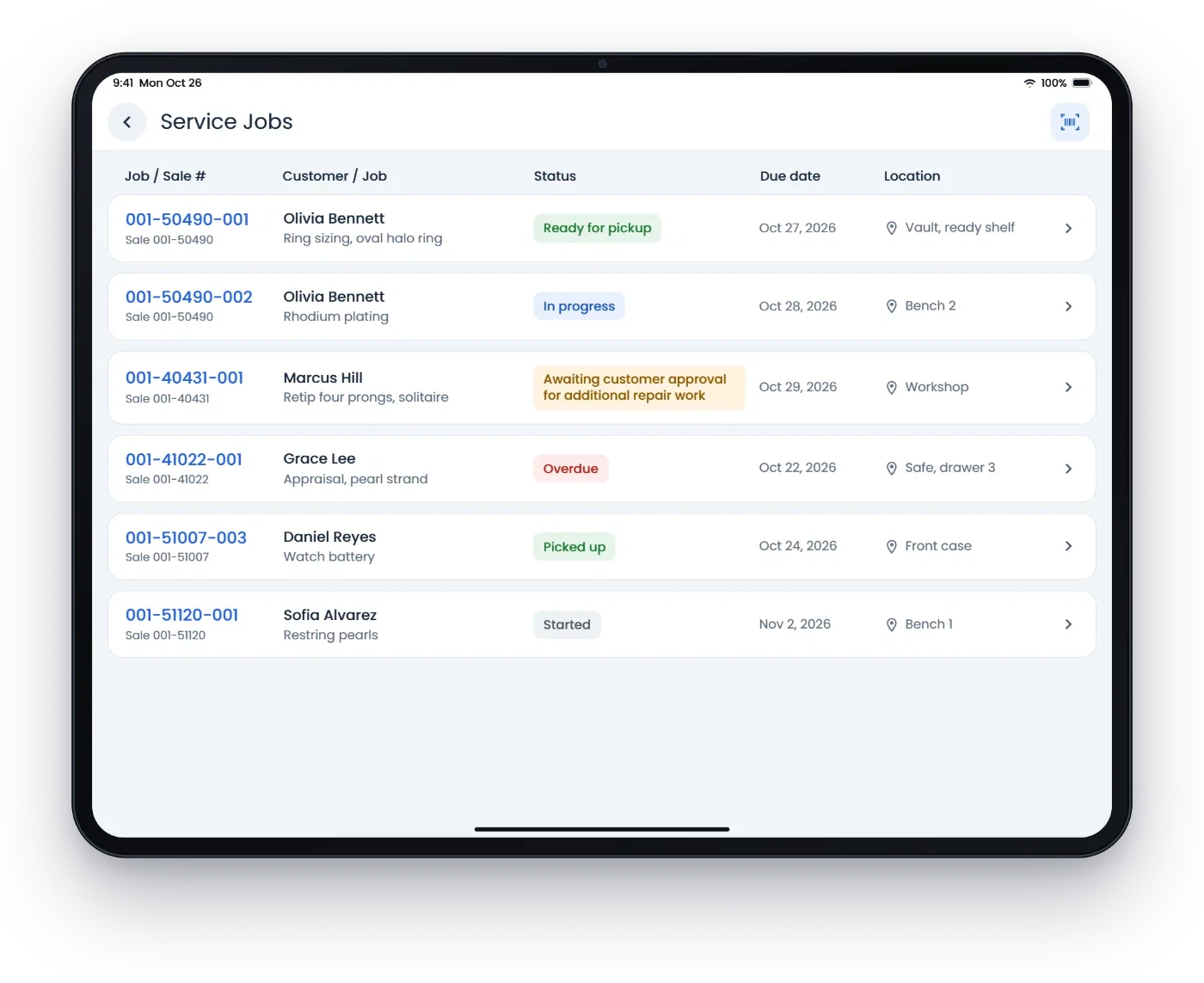
Every job from the counter to pickup, on the customer's record.
- Intake
- Photos, condition, estimate, due date and a deposit when the piece comes in, with the customer's signature.
- Status and location
- See every job's status, due date and where it sits: on the bench, in the safe or sent to a vendor.
- Quotes approved by phone
- Send For Customer Review with the price. The customer gets a link by text or email, approves the estimate and, if you ask, pays right there.
- Vendor jobs
- Send jobs to outside vendors and track them until they come back.
- Custom builds
- Quote, take a deposit, send design options by text and get the customer's approval, then track the build with photos, parts and labor until pickup.
- Ready for pickup
- Set the job to Pending Customer Pickup with a customer notification, and the text goes out.
- Appraisals
- Photos, appraisal types and appraiser signatures by phone. See appraisals.
- Repair status by phone
- The AI receptionist tells callers where their repair stands. See repair tracking.
Customers and clienteling
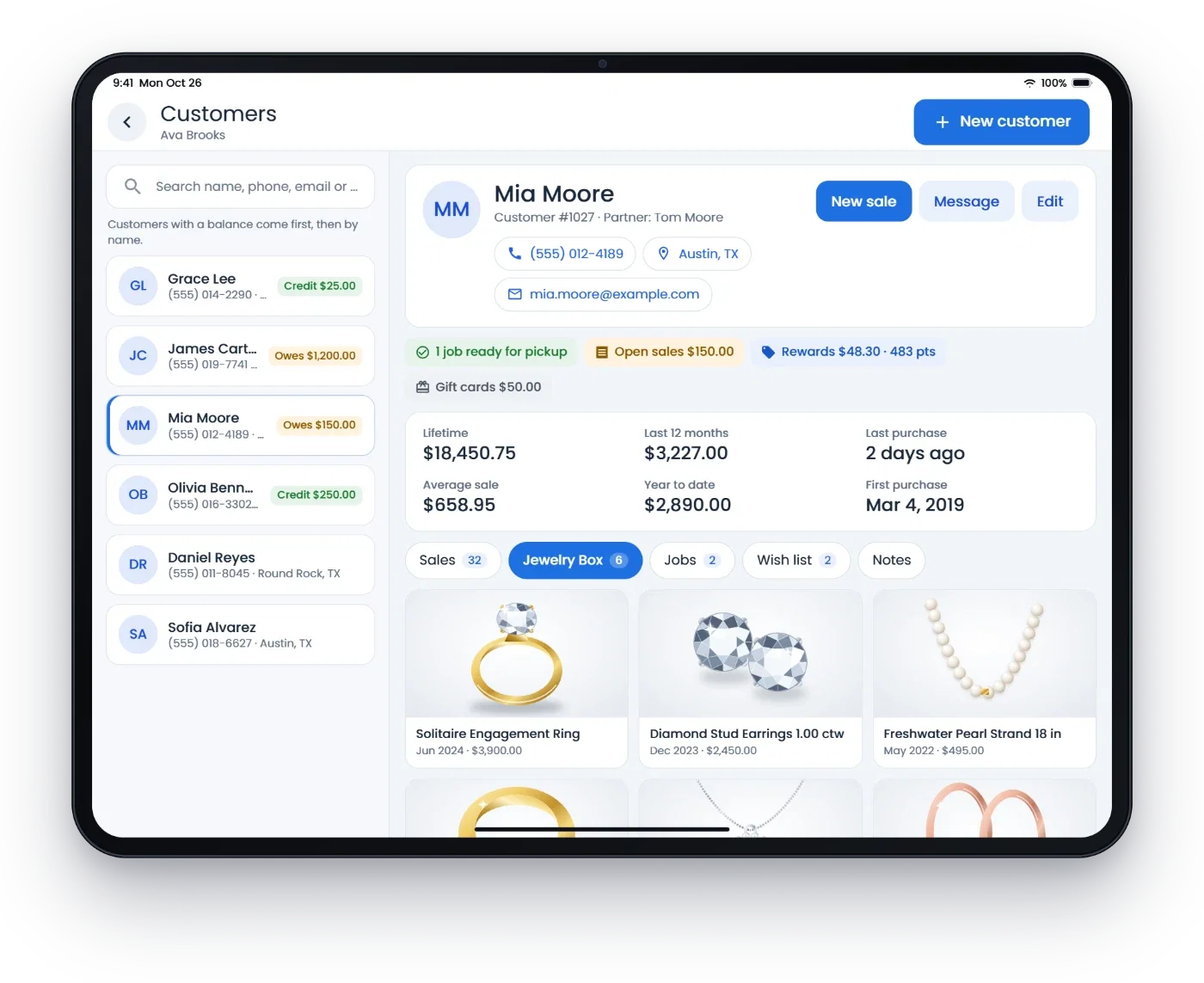
One record per customer, with everything your team needs before they say hello.
- Purchase history
- Every purchase and the customer's lifetime value, with repairs, appraisals and layaways alongside.
- Appointments
- Book engagement ring visits, estate pieces to look over and more. The customer gets a confirmation email with calendar links and a reminder the day before, and Calendar Sync puts bookings on Google Calendar or Outlook.
- Sizes and details
- Ring sizes and custom fields for whatever your store wants to remember.
- Dates
- Birthday and anniversary reminders.
- Wish lists
- Wish lists with restock alerts.
- Client lists
- Smart client lists and segments for outreach.
- Jewelry Box
- The pieces a customer bought from you as a grid, table or timeline, shared as a private link or PDF.
- Relationships
- Link related customers and fix duplicate records.
- Rewards program
- Points earned and used, on the customer's record. See clienteling.
Texts, calls and marketing
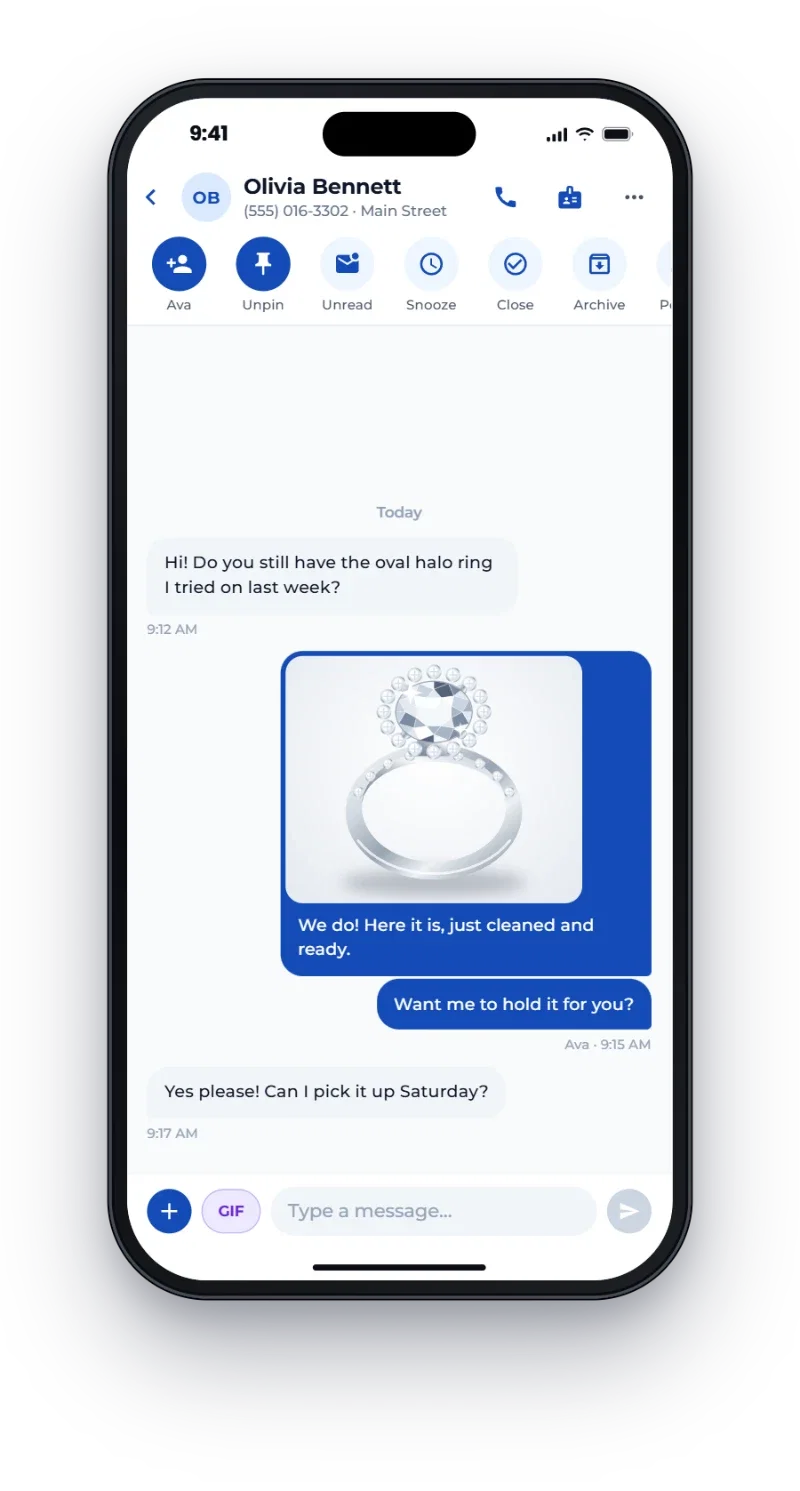
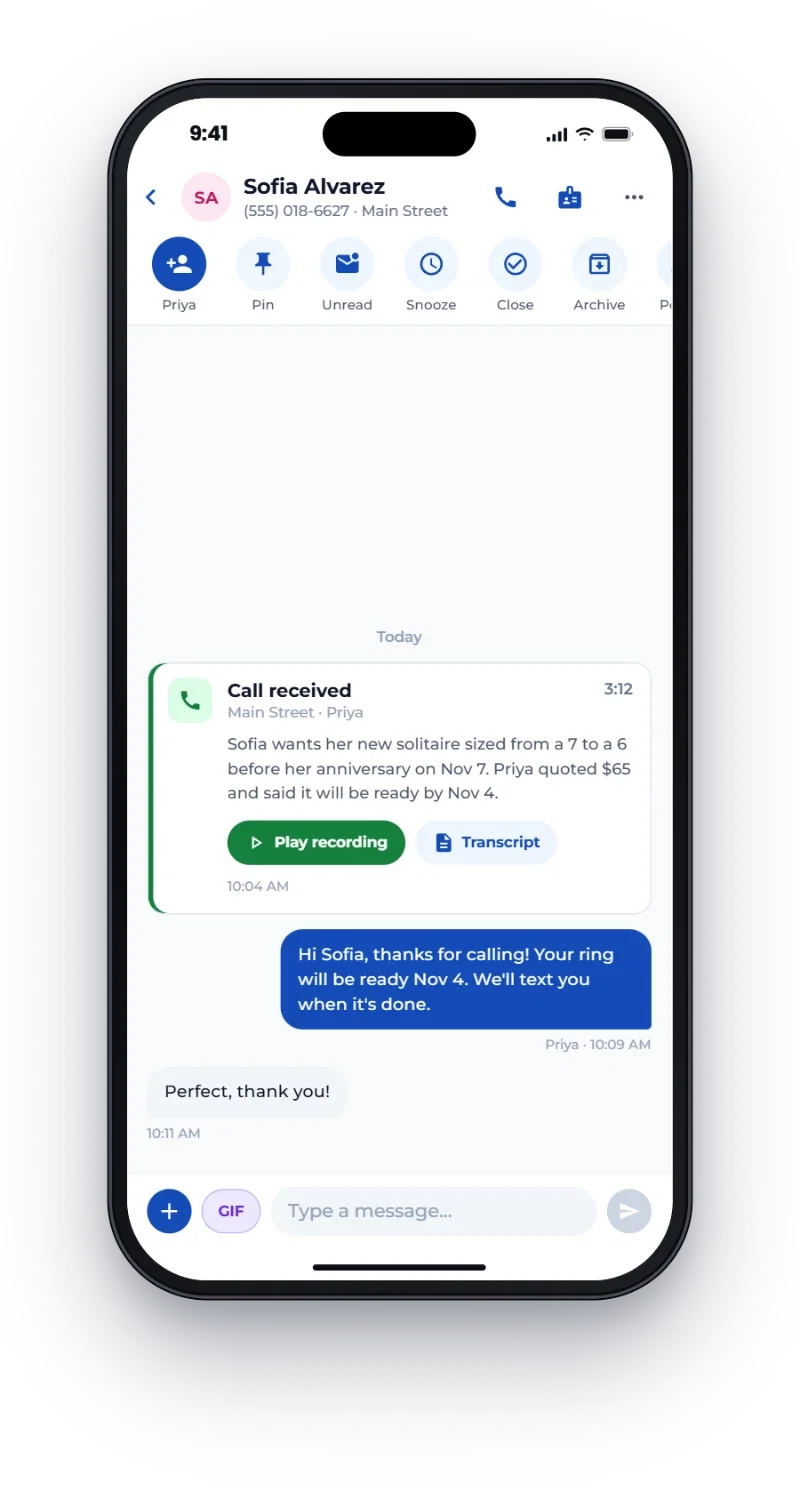
Customer conversations on your store number, kept on the customer's record.
- Inbox
- Texts, email and web chat in one inbox, with a texting widget for your website. Assign it, snooze it, close it.
- Photos by text
- Text a photo right from the case, from a computer or your phone. Every message stays on the customer's record, and nobody hands out a personal cell.
- Store phone system
- Calls on your store number, on a computer, a desk phone or your cell. Transfer a call to anyone on the team.
- Caller ID
- The customer's name, history and balance come up before you answer.
- Call notes
- The recording, the transcript and a short summary go on the customer's record.
- AI receptionist
- Answers calls, greets callers by name, gives repair status and hands the call to a person when asked. See AI receptionist.
- Campaigns
- Email and text campaigns to customers picked by what they bought, with engagement tracking. Build the email with AI and add a photo to the text. Marketing texts only go to people who replied YES.
- Website visits
- When a customer clicks your email, their website visits land on their record: where they came from, the pieces they viewed and what went in the cart. For shoppers your website recognizes.
- Automatic emails
- Birthday and anniversary emails, a thank-you with a review link after a purchase, personalized follow-ups, and an email when a shopper looks at pieces but does not buy.
- Social posts
- Write it once in Flawless Socials and post to Instagram, Facebook, TikTok, Pinterest and more, now or on the calendar.
Website and online store
A website built from your own inventory, so you do not keep two catalogs.
- Synced with inventory
- The store and the website share one inventory, so a piece sold in the store is gone from the website. Load pieces onto your website from the POS. See website and online store.
- Page builder
- Build pages with the AI page builder, with version history and SEO titles and descriptions.
- Online orders
- Online orders, coupons and payments. Store gift cards work at online checkout too.
- Sales online and in store
- Run a sale online and in the store at the same time.
- Shipping
- Print the label from the sale and email the customer the tracking link.
- Product photos
- AI Product Studio makes the product photos for new pieces. See AI photos and video.
- Product feeds
- Google, Facebook and Instagram product feeds.
- Events and blog
- Events, trunk shows and a blog on your site.
- Other platforms
- Keeping Shopify or another big platform? Flawless works with them.
memo-photo.jpgReceive this memo into the main store and print the tags on the front printer.
This memo has 8 pieces. I will create them as products and receive them into the main store. I texted a code to your phone. Read it to me to receive them.
482913
Done. The 8 pieces are received in the main store and 8 tags are printing on the front printer.
Claude connector and AI agents
Connect Claude to Flawless and ask about customers, products, sales and wholesale in plain words.
- Receive from a photo
- Send Claude a photo of the vendor's invoice or memo. It creates the products and the receive, and prints the tags once you enter the code we text you. See Claude connector.
- Your permissions
- Your store decides who may connect. Every change follows the permissions of the person asking, with a 6-digit code texted to them first.
- AI agents
- Turn them on in the Automation Center. They fill in missing catalog details, write product copy and make product photos.
Wholesale
For jewelry wholesalers, or retailers with a wholesale side, in the same system as retail.
- Proposals, invoices and memos
- From the first proposal to the invoice, with memos in between.
- Sales orders
- Sales orders and allocation.
- Payments and statements
- Payments, credits and statements.
- Returns
- RMAs and returns.
- Client portal
- Your accounts see their memos and invoices online. See wholesale.
- Price tiers
- Wholesale and VIP price tiers.
Reports and back office
The numbers and the admin work behind the counter.
- Reports
- Sales, staff, product, aging and inventory reports.
- Commissions
- Commissions calculated for you.
- Accounting
- QuickBooks sync, with multi-store reporting and accounting.
- E-commerce analytics
- See how your website and online orders are doing.
- Staff
- Pay, scheduling, tasks, and clock in and clock out.
- Cash drawers
- Cash drawers and end of day.
Hardware and integrations
Devices from one supplier, and connections to the services jewelers already use.
- Payment terminals
- PAX A920 Pro, A77, A3700 and L1400.
- Printers and scanners
- Receipt printers, tag printers and scanners. See hardware.
- RFID
- RFID readers, tags and tag printers.
- Apps
- POS and clienteling apps for iPhone, iPad and Android.
- Integrations
- Shopify and other big platforms, QuickBooks, GIA, JM Shipping, JM Care Plan, IFS (InForSure), BIG and BriteCo. See all integrations.
- Switching
- We bring over your inventory, customers and sales history. See switching to Flawless.
Data safety
Your inventory, customers, sales and photos are kept on Microsoft Azure in the United States, behind a web firewall, with copies in a second region, a second cloud and on our own hardware.
- A web firewall
- Every visit passes a web application firewall first. It stops common attacks and bad bots, and the gateway in front runs across separate data centers.
- Copies in more than one place
- Every disk is kept as three copies in separate data centers, and a live copy runs in a second Azure region, minutes behind at most.
- Backups in a second cloud
- Backups every 15 minutes to a second cloud provider, outside Microsoft and locked against deletes, with a copy on our own hardware and a restore tested every week.
- Your own staff accounts
- Each person signs in with their own account, and what they see and do follows the role and permissions you give them. See is my data safe?
More about each part
The full pages, with how each part works in a store and common questions.
Tags and tag printers
RFID and barcode tags printed from your inventory.
ERP for wholesalers and makers
Components, assembly, vendor jobs and your books.
Website design
Set up by us, changed by you.
POS on an iPad
Sell and look up customers from an iPad.
Store management
The whole store in one system.
Card processing
Rates matched or beaten, no hidden fees.
Inventory
Jewelry details, receiving, counts and transfers.
AI photos
Product and model photos from a store photo.
Claude connector
Receive stock from an invoice photo in Claude.
Repair tracking
Intake, deposits, vendor jobs and pickup.
Appraisals
Photos, types, signatures by phone.
Memo and consignment
Goods you hold or lend, tracked apart.
RFID inventory
Counts, checkout and tag printing.
Clienteling
The customer record and outreach.
AI receptionist
Calls answered, repair status given.
Website and online store
Built from your inventory.
Wholesale
Proposals to statements, client portal.
Switching to Flawless
What comes over and how long it takes.
Data safety
Firewall, copies and backups.
Free templates
Printable repair, appraisal and memo forms.
Guides
Jewelry store KPIs
10 numbers to check every month.
Layaway and special orders
Keep holiday deposits straight.
Jewelry sales commission plans
Splits, trade-ins and fair credit.
Jewelry POS integrations
QuickBooks, GIA, Jewelers Mutual and Shopify.
Scrap gold buying
Pricing by karat, weight and spot.
Gold price and margins
Jewelry pricing that protects margins.
Jewelry store return policy
A guide to holiday returns and exchanges.
What's new, fall 2026
The latest Flawless POS updates.
Call recording and transcription require appropriate consent.
Product names are trademarks of their respective owners. Flawless POS is not affiliated with them.
See it with your own questions
A 30-minute walkthrough with our team. Bring the parts of your store you want to see.
Questions first? Email help@flawlesspos.com or send us a message.